

You open Seller Central to check orders and find a deactivation notice instead. You reread the message, check your listings, and wonder what Amazon thinks you did wrong. Before you send an appeal, treat that notice like a diagnostic report: the policy name, metric, affected listing, and document request tell you what you need to investigate.
If you're asking, “Why is my Amazon account suspended?” start with the exact allegation. You need a different response for late shipments, unverifiable inventory, and a connection to another seller account. A polished explanation won't help much if you answer the wrong question.
Match Your Suspension Notice to a Likely Cause
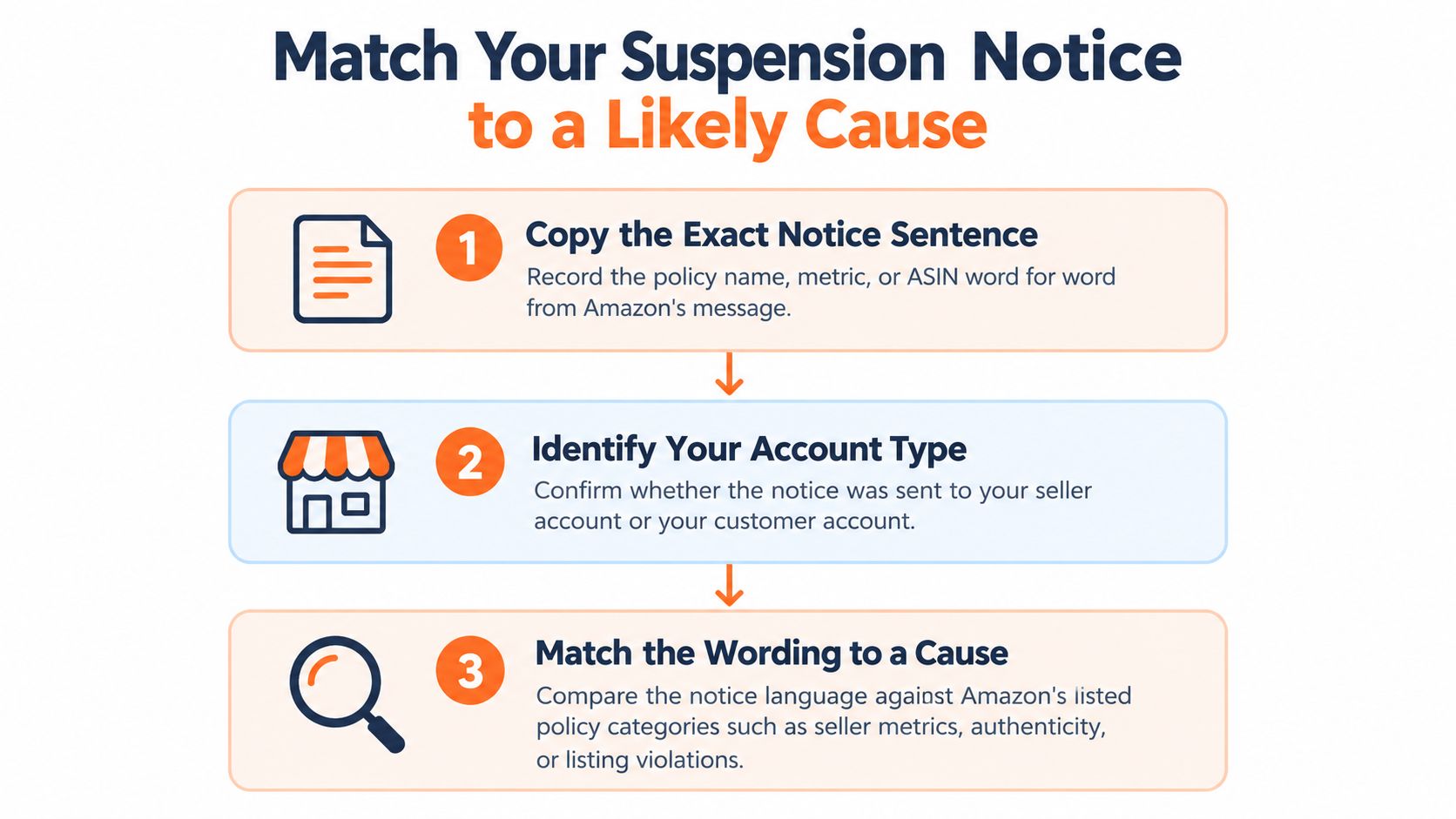
A notice naming a specific policy, metric, or ASIN gives you the starting point for your investigation. Copy its exact wording, including any deadline. Read the allegation before deciding what your records mean, especially if the notice concerns authenticity, account links, or performance.
First confirm which account Amazon has restricted. A customer account may receive an “Account on hold” email or text after unusual payment activity. Follow the steps in Amazon's customer-account hold instructions, and provide the information the notice requests. Those instructions relate to customer accounts, not seller suspensions.
For a seller account, compare the Seller Central notice with the categories below. A community discussion about seller suspensions is not an official policy source. Use your own notice to identify the allegation and check each named issue against your records.
Notice wording mapped to likely cause
Treat the last column as a place to begin checking, not a document checklist. A single notice can point to more than one issue, and linked-account allegations deserve the same careful review as performance or product complaints.
| Notice wording or symptom | Likely cause | Where to check first |
|---|---|---|
| Customer account on hold email | Unusual payment activity | Sign-in portal and information requested in the notice |
| Notice names Order Defect Rate or cancellation rate | Metric above Amazon's limit | Account Health, cited metric and time period |
| Notice names Late Shipment Rate | Late dispatch pattern | Shipment dates and carrier scans |
| Notice names intellectual property or infringement | Rights-owner complaint on a listing | Complaint details and affected listing record |
| Notice names inauthentic or counterfeit | Authenticity complaint or unverifiable sourcing | Invoices and supplier records |
| Notice names duplicate or multiple accounts | Account linkage | Shared information list and former-account history |
| Notice names review manipulation | Review abuse on listings | Review requests, incentives, and buyer messages |
| Notice names used items sold as new or wrong item | Listing misdescription | Affected ASIN, photos, and order records |
| Notice names prohibited product | Restricted product or category | Category approval and product safety documents |
| Notice is vague or names no policy | Account-level risk or unresolved violations | Full violation list on Account Health |
Use this three-step visual to organize your first review.
Separate the allegation from your explanation
Keep two sets of notes: what Amazon alleges and what your records show. That separation helps prevent a recent buyer complaint from being mistaken for the cause of an unrelated account restriction.
If the notice is vague, record what you cannot yet verify rather than guessing. Check the full Account Health record, identify the policy requests, and compare them with the affected orders, listings, or account details. If the notice points to another seller account, investigate the shared information and account history even when you see no separate listing violation. Keep uncertain findings in your investigation, not as confident claims in an appeal.
Seller Metric Limits and How Few Orders Break Them
A seller can process dozens of orders correctly and still cross a performance limit after a few failures. Read each threshold alongside its measurement period. Amazon's Order Performance policy sets the limits below; the examples show the number of problem orders per 100 that reaches or exceeds each limit.
Seller metric limits and orders that breach them
| Metric | Limit | Measurement period | Bad orders per 100 that breach it |
|---|---|---|---|
| Order Defect Rate | Below 1% | 60 days | 1 defective order (1%) |
| Seller-canceled order rate | Below 2.5% | 7 days | 3 canceled orders (3%) |
| Late Shipment Rate | Below 4% | 10 or 30 days | 4 late shipments (4%) |
The Order Defect Rate limit is below 1%, so one defective order per 100 reaches the limit and fails the requirement. The other examples also reach or exceed their stated thresholds. These calculations illustrate the rates; check the order count and measurement period Amazon uses for your account.
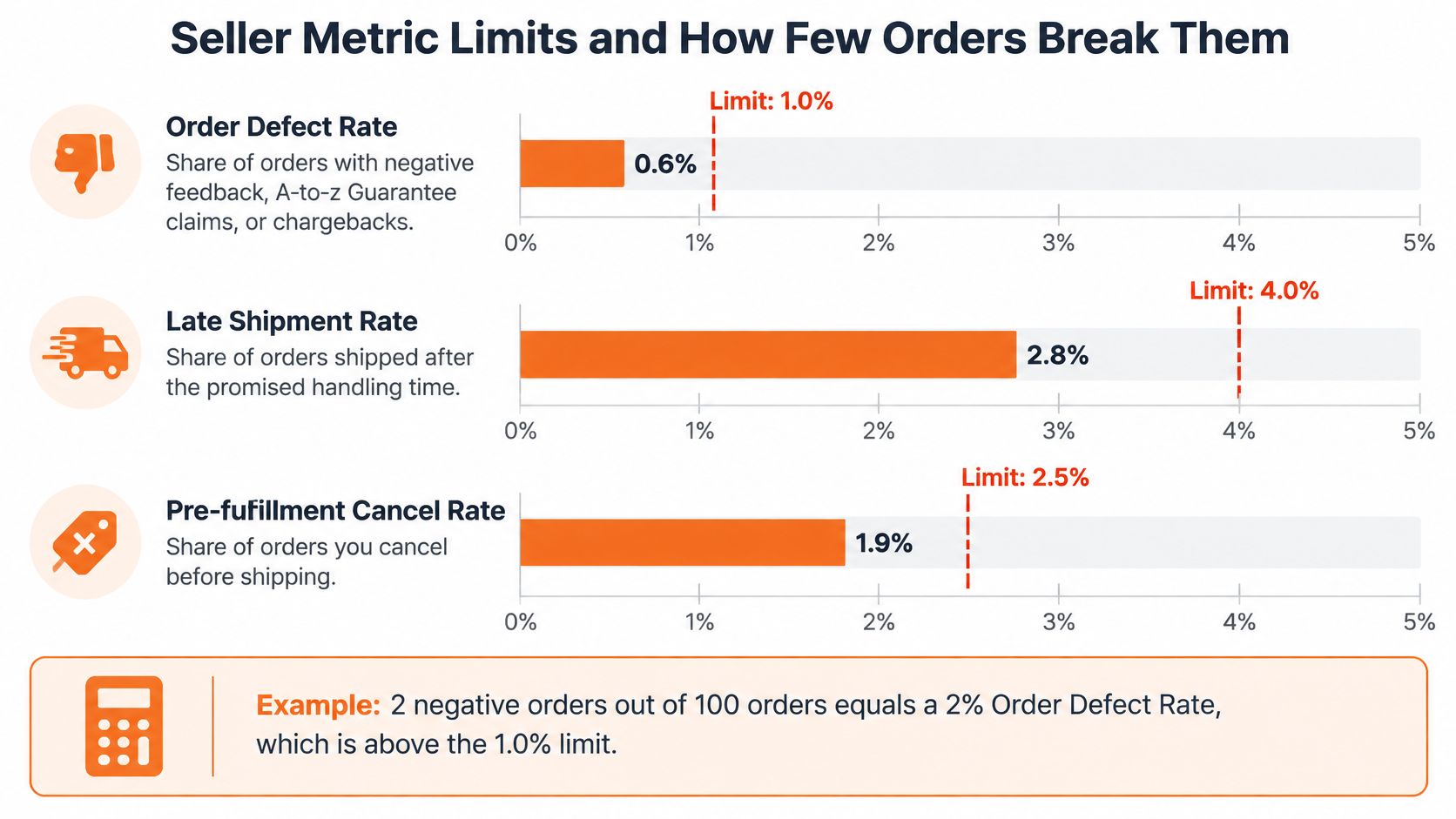
Order Defect Rate covers orders associated with negative feedback, an A-to-z Guarantee claim, or a credit-card chargeback. A dispatch review alone will miss some causes. Check the complaint and payment-dispute records tied to the affected orders.
Low order volume makes each failure count more. A seller can fulfill most orders successfully and still breach a rate limit, especially while sales volume is growing.
Practical rule: Explain the process behind the failed rate. The percentage shows the result; order records can show why it happened.
Trace the affected orders
Use a spreadsheet to rebuild the order set, rather than relying on memory.
- Find the window. Open Account Health and record the period Amazon cites.
- Pull the order set. Review every order within that period, including successful orders that form the denominator.
- Classify each failure. Separate buyer complaints, cancellations, dispatch delays, and chargebacks.
- Check for patterns. Compare ASINs, suppliers, dispatch dates, stock discrepancies, and fulfillment handoffs.
- Tie the correction to the cause. Fix inventory synchronization when stock discrepancies caused cancellations. Address packing or dispatch capacity when those processes caused delays.
A carrier may contribute to a late shipment, but confirm where the failure occurred before assigning responsibility. Compare the promised handling time with dispatch records and available scans.
Use the video as a walkthrough, then verify its examples against your own Account Health records.
Connect the affected orders to a specific process failure in your explanation. “We'll ship faster” does not identify what changed. A documented adjustment to dispatch capacity gives Amazon a concrete corrective action to assess.
How Unresolved Violations Build Toward Suspension
Think of unresolved violations as water in a bucket. Each unresolved issue adds water, but Amazon doesn't treat every issue as the same size. Severity and customer experience matter too.
Amazon's Account Health Rating framework considers unresolved violations, their relative severity, and customer impact. Amazon may deactivate accounts it rates “At Risk” or “Critical.” You therefore need to inspect the complete unresolved record instead of assuming the newest notification explains everything.
Build a working violation log
Create a log with these fields, then sort it by deadline. Keep the wording specific enough that you can return to the relevant Seller Central record without searching through messages.
| Policy type | Severity | Affected ASIN | Deadline |
|---|---|---|---|
| Copy the named policy | Record Amazon's stated severity | Record the affected identifier | Copy the notice's response date |
Don't downgrade an issue because it looks old. An unresolved warning still needs attention, and additional violations or uncorrected performance problems can increase account risk under Amazon's framework.
Your log should distinguish the allegation, the operational correction, and the proof that you completed it. Keep those details in supporting notes rather than cramming everything into the deadline column.
Fix the control behind the warning
Choose a correction that addresses the actual failure.
- Inventory discrepancies: Reconcile available stock against your selling quantities and retain the reconciliation records.
- Fulfillment overload: Match your handling commitments to the capacity you can realistically support.
- Listing inaccuracies: Compare product descriptions and condition claims with the inventory you ship.
- Complaint handling: Define who reviews unresolved complaints and when that person escalates them.
- Prohibited-product concerns: Check products against the relevant restrictions before listing them.
Record when you changed the process and retain evidence from normal operations. A written procedure explains your intended behavior; completed inspection records or reconciliation logs show that you've started following it.
Don't confuse clearing a notification with repairing the process that produced it.
A promise can describe your intention, but it can't demonstrate execution. Give Amazon records it can check, and keep reviewing the rest of your unresolved issues while you address the most urgent deadline.
Authenticity and Brand Complaints Explained
A listing complaint and an account-level trust concern need different scopes of investigation. For a listing complaint, start with the affected product and transactions. For an account-level concern, examine your sourcing practices and account history across the business.
Amazon's 2024 Brand Protection Report describes cooperation among its Counterfeit Crimes Unit, brands, customs agencies, and law enforcement to identify counterfeiters, close bad actors' accounts, seize inventory, and pursue prosecutions. You can face an authenticity concern even when you believe your merchandise is genuine if you can't verify where it came from.
Product-level issue versus account-level trust concern
| Factor | Product-level issue | Account-level trust concern |
|---|---|---|
| Typical trigger | An inauthentic-item or IP complaint against a listing | Repeated complaints, unclear sourcing, or review manipulation across listings |
| What Amazon reviews | Affected ASIN and its transactions | Supplier chain, invoices, and account history |
| Typical fix | Correct the listing and substantiate its transactions | Full Plan of Action with supplier verification and inventory separation |
| Reinstatement difficulty | Lower when the correction stays limited to a listing | Substantially harder, especially after an attempt to evade a prior suspension |
Treat this comparison as a scoping tool, not a promise of reinstatement. A narrow complaint can still require substantial evidence, and correcting a description doesn't resolve every intellectual-property allegation.
Inspect the physical stock as well as the paperwork.

Separate authenticity from intellectual property
An authenticity complaint asks whether you can substantiate the product's sourcing. An intellectual-property complaint concerns the rights allegation against the listing. Don't assume an invoice answers every issue the rights owner raised.
Before writing, identify what you need to prove:
- Product connection: Tie the affected ASIN to the relevant purchase and sales records.
- Supplier traceability: Explain who supplied the stock and how you checked that supplier.
- Inventory correction: Separate suspect inventory from stock you can substantiate.
- Listing controls: Review the product claims and identifiers associated with the complaint.
The trade-off is scope. Investigating every product without a reason wastes effort, but treating repeated sourcing complaints as an isolated listing error leaves the broader concern unanswered. Let the notice and transaction history determine how far you investigate.
Linked Accounts That Trigger Suspensions Without Violations
A seller can have no performance or authenticity violation and still receive a related-account suspension. The notice itself is the starting point: identify the account relationship Amazon is questioning, then check which shared details could explain it. Connections may involve business information, devices, addresses, payment methods, or service providers.
Amazon's related-account guidance is a seller-forum discussion, not an official policy document. Treat it as a prompt to review possible relationships, not proof of Amazon's requirements. Your notice should determine what information to submit and the deadline to meet. Missing the deadline stated there can result in deactivation.
Audit the connection before denying it
Check your records before making a blanket denial. A former partner, shared household, or service provider may explain an overlap, and later evidence can undermine a response that ignored it.
- List shared information. Check business addresses, networks, devices, bank or card details, and service providers.
- Review account history. Include former businesses, partners, household members, and accounts you no longer control.
- Explain each overlap. Find records showing ownership, access, service relationships, or when a relationship ended.
- Answer the notice. Provide the information requested, rather than a broad account history that does not address the concern.
A shared warehouse or accountant is a lead to investigate, not proof that two businesses have common ownership or committed wrongdoing.
Linking signals and the proof to prepare
Use the examples below to organize records, then follow the document request in your specific notice. Evidence should clarify who owned or controlled each account and why information overlapped.
| Link signal | Legitimate example | Proof to prepare |
|---|---|---|
| Shared address | Home office or coworking space used by separate businesses | Lease, utility bill, and business license |
| Shared network or device | Household members use the same connection | Written list of users and devices |
| Shared payment method | Spouse's card or joint bank account across entities | Bank statements and account ownership letter |
| Shared service provider | Same accountant, warehouse, or logistics firm | Contracts and service agreements |
| Former account still open | Seller account you no longer control | Sale or transfer agreement and contract termination |
| Shared identity records | Personal ID appears on separate business filings | Identity documents and business registrations |
Separate ownership, operational control, and incidental overlap in your explanation. If you sold a business, provide the transfer records; saying you stopped using its account does not establish who controls it now.
Don't open a replacement seller account during review. Amazon discourages this response, and it can trigger further enforcement. Address the suspected connection with records instead of creating another registration.
Build Evidence and Write the Appeal
A suspension notice is the starting point for your appeal. Its wording identifies the issue Amazon wants resolved, whether the concern is account performance, authenticity, intellectual property, or a relationship with another account. Build an allegation-to-evidence matrix before writing your Plan of Action. For each allegation, connect the notice to the affected item or account, supporting records, root cause, completed correction, and preventive control.
Amazon's appeal and complaint guidance distinguishes account reactivation through Account Health from intellectual-property appeals against the affected listing record. Check which process the notice directs you to use before preparing documents. A linked-account suspension needs evidence about ownership and operational control; a performance complaint may require order records, metric details, and proof of corrective action. Use the specific allegation to decide what belongs in the submission.
Build the evidence matrix
Keep every allegation tied to the record and proof that addresses it:
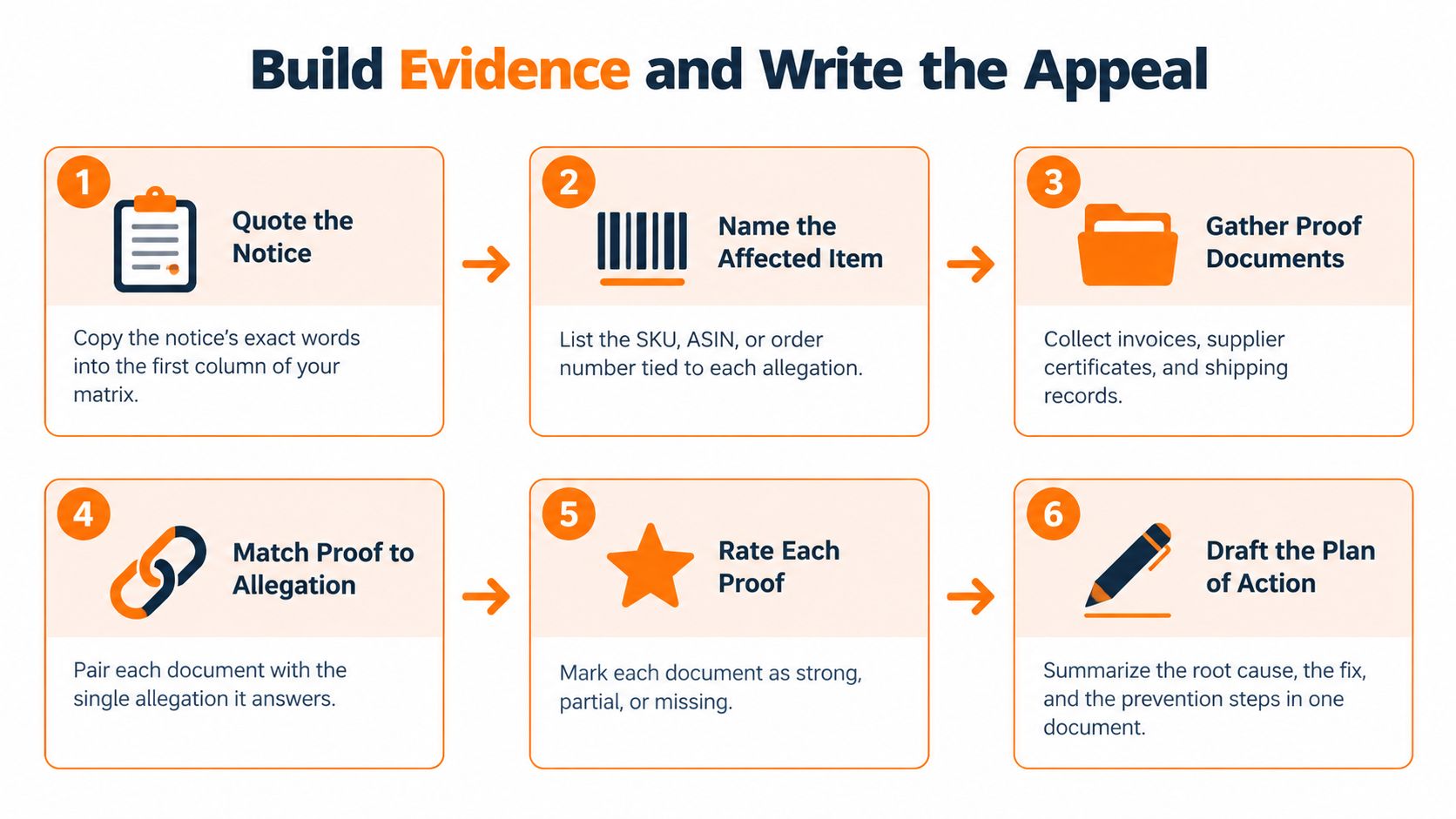
- Quote the notice. Copy the exact allegation into your working document.
- Name the affected record. Identify the SKU, ASIN, order, account relationship, or metric named.
- Attach relevant proof. Select the transaction, supplier, ownership, or shipment record that answers the allegation.
- Explain the root cause. Describe what failed. If you dispute the allegation, state the precise mismatch.
- Document the correction. Record what you completed, which items or accounts it covered, and when.
- Define prevention. Name the control, who owns it, and how often it is reviewed.
Organize the Plan of Action around the same evidence trail:
Root cause: State the specific cause connected to the allegation.
Corrections: List completed actions, affected ASINs or orders, and completion dates.
Controls: Explain who performs each check and how often.
Evidence: Identify each attachment by filename and say what it demonstrates.
Treat this as a structure, not submission-ready language. Replace general statements with details supported by your records.
Use the visual guide as a final organization check.
Check document quality before uploading
For authenticity complaints, check the invoice-age and document requirements in the specific Seller Central notice or request. Requirements may depend on what Amazon is asking you to establish, so do not assume one invoice-age rule applies to every case. Amazon's document and reactivation guidance also cautions that missed response windows or exhausted unsuccessful appeals can prevent continued selling and may affect payments.
Reconcile the legal entity name, address, supplier identity, product identifiers, quantities, dates, and payment or shipment records. If records show different business details, explain why and attach documents that support the explanation. Keep originals unaltered. Editing an invoice or other primary record to make details appear consistent can undermine the rest of your evidence.
Evidence types and rules for each
| Evidence | What it proves | Rule to follow |
|---|---|---|
| Unaltered supplier invoices | Sourcing for the affected product when supporting records establish the connection | Confirm the invoice-age and document requirements in your notice or request; never edit originals |
| Business registration records | Legal entity name and address | Reconcile details with invoices and account records |
| Utility or financial statements | Business address and activity | Use records that meet Amazon's request; reconcile names and addresses |
| Identity documents | Owner's identity and connection to the account | Match the account holder's details |
| Order and shipment records | Transactions related to a complaint or dispatch issue | Include dates, quantities, and tracking numbers |
| Supplier identity records | Supplier identity and sourcing relationship | Include supplier contact details and relevant product identifiers |
| Inventory and reconciliation logs | Operation of corrective controls | Use dated entries from your own system |
A supplier invoice may support sourcing, but it does not automatically connect every product and quantity to the inventory under review. Match it to the affected items with inventory or purchasing records. A tracking record can confirm shipment details while leaving an authenticity allegation unanswered. Choose attachments that prove the point they are meant to establish.
Relevance matters more than attachment volume. Submit enough material to support each allegation. Unrelated files can introduce inconsistencies that you then have to explain.
Write what you know, not what sounds persuasive
A generic apology and a promise to follow Amazon's rules do not explain what failed. State the operational cause and the correction you have already made. Clearly separate completed actions from steps you still plan to take.
If you believe Amazon identified the wrong item, account, or transaction, state the exact mismatch and attach the primary record that supports your position. Do not claim misconduct that did not occur just to fit an appeal template. A disagreement still needs evidence.
Before submitting, check your response against the notice:
- Coverage: Have you answered every named violation?
- Consistency: Do your explanation and attachments agree?
- Traceability: Can a reviewer connect each file to an allegation?
- Completion: Can you prove the corrections you describe?
- Workflow: Are you using Account Health reactivation or the relevant listing complaint process?
- Timing: Have you met the deadline in your notice?
Submit through the Seller Central workflow specified for your case and retain a copy. If the notice requests an upload, an additional email does not replace that submission.
If Amazon rejects the appeal and allows another submission, use the rejection to identify what remains unresolved. Correct that gap and provide the relevant records instead of sending the same explanation again. Reinstatement is not guaranteed, but a specific, consistent submission gives the reviewer evidence that can be checked against the notice.
Leave a Reply