
You bought the domain, picked a product, and maybe even opened a storefront. Then the first order arrives while a supplier asks about a reorder, a customer wants to change their address, and your ad dashboard says you're spending money without making much back. That's the job: keeping the whole business moving, not just getting a store online.
An ecommerce store owner makes decisions across product, marketing, customer experience, operations, and cash. The work gets easier to manage when you treat it like a role with clear responsibilities, measurable trade-offs, and a plan for what to learn first.
What an Ecommerce Store Owner Actually Does
The first order can make the business feel simple: someone found your product, paid, and now you ship it. Then the work behind that order starts. You check the address, confirm inventory, buy a label, answer a delivery question, update stock, and make sure the sale still made financial sense after fees and shipping.
That's why an ecommerce store owner often starts as the whole team. You choose products and suppliers, write listings, manage the storefront, promote the offer, pack orders, respond to customers, and track the money. Think of a small shop with every department squeezed behind one counter. If you neglect the stockroom, you sell products you can't ship. If you ignore customer questions, shoppers may leave before they buy.
The work changes as orders arrive
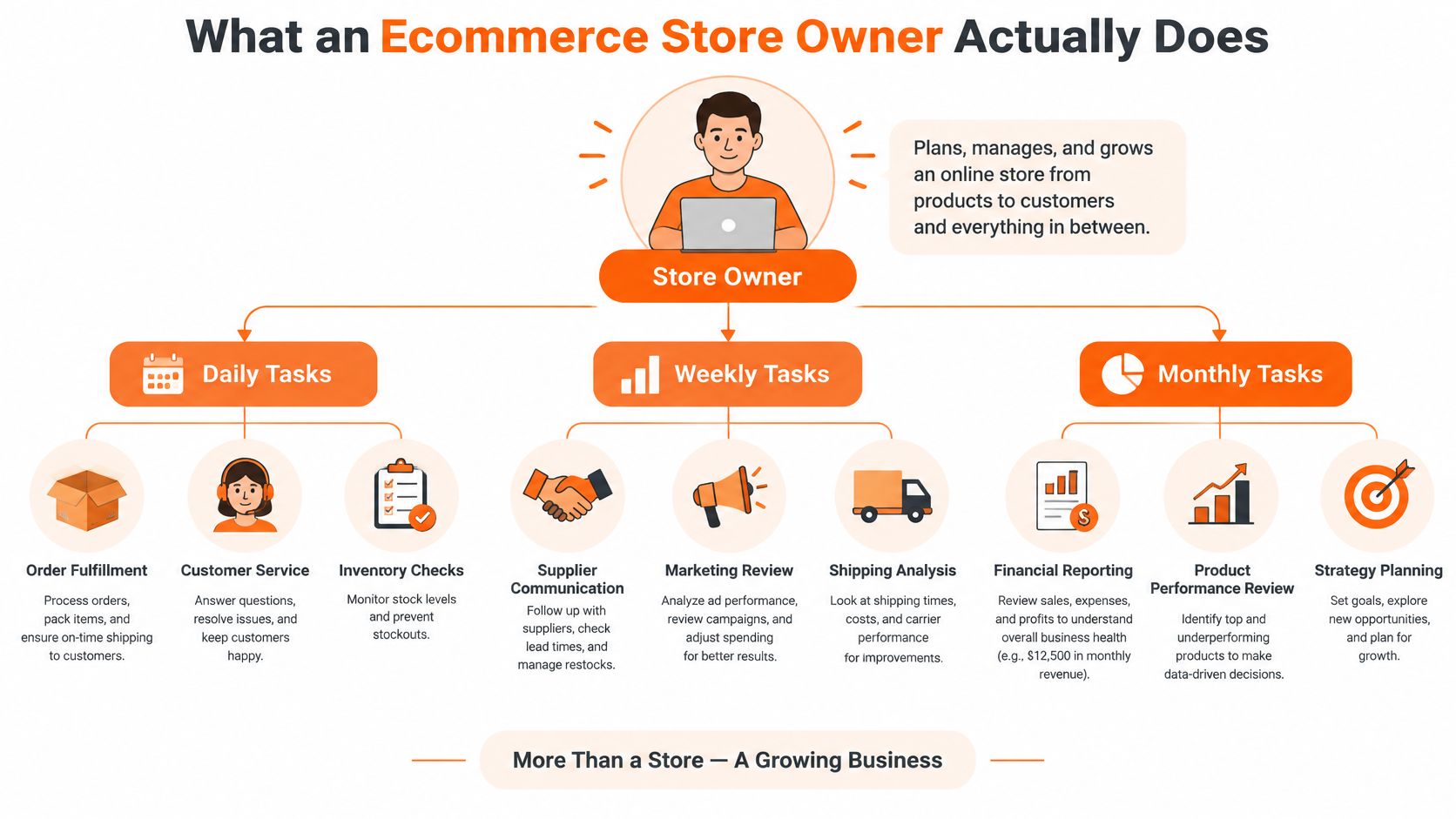
Your days tend to revolve around live problems: orders, stock, customer messages, and site issues. Your weekly rhythm can include supplier follow-ups, marketing review, and checking shipping costs. Monthly, you need to review cash, product performance, and what to change next.
The trap is treating visible work as the important work. A fresh logo feels satisfying; finding out why a product page gets visits but few orders is less glamorous and more useful. For practical examples of the operator's work across a product business, PlatformDTC's operator playbook can help you think beyond the storefront.
Keep ownership of product decisions, pricing logic, customer promises, and cash visibility while you're learning the business. You can eventually hand off repeatable tasks such as label printing, routine customer replies, or bookkeeping prep, but don't outsource a process you can't explain. You need enough context to spot when a contractor's work saves time and when it hides a problem.
Core Responsibilities You Cannot Skip
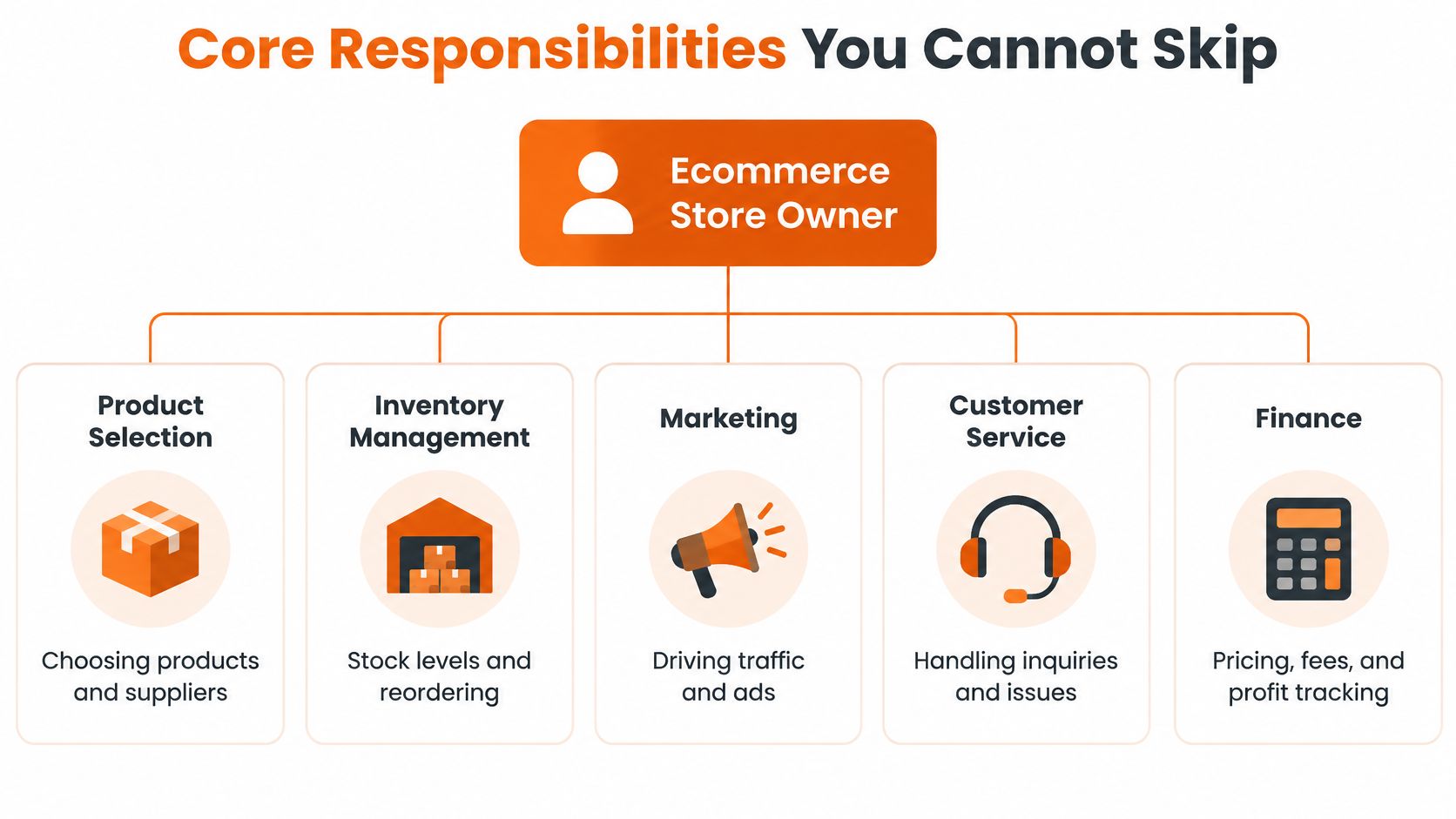
Every responsibility in an ecommerce store needs an owner, a process, and a clear handoff. At first, that owner is you. You do not need to perfect every task before launch, but you do need to know who will do it and what happens when it goes wrong.
Use this working checklist:
- Choose products and suppliers: Check whether people want the product, whether the supplier can meet your standards, and whether the landed cost leaves room for the rest of the business. A low unit cost means little if quality problems trigger refunds.
- Set up the storefront: Make product details, sizing, shipping, and return terms easy to understand. A polished theme cannot rescue a confusing offer.
- Bring in qualified traffic: Choose channels that fit your customer and budget. Ads can test demand, but they can also magnify a weak product page.
- Convert visits into orders: Review the path from product page to payment. Test changes against completed orders, not how attractive the page feels.
- Fulfill reliably: Track stock, pack orders carefully, and communicate delays. Your shipping promise is part of the product.
- Handle what happens after checkout: Answer questions, resolve mistakes, and use return reasons to spot problems with product quality, descriptions, or fit.
- Track the money: Keep sales, fees, shipping, refunds, and inventory costs visible. Revenue alone will not tell you whether an order helped the business.
The checkout data behind these responsibilities sits in the revenue-leaks section below. The point here is simpler: if a step can fail, give it a rule before it needs a rescue. AI drafts and templates can speed up routine work, but you still own the promise made to the customer.
In your first month, prioritize a sound product offer, clear shipping and return information, a working payment flow, and accurate order fulfillment. A perfect logo can wait. Broken checkout cannot.
Common Business Models Side by Side
The business model changes what you buy, how you reach customers, and where cash gets stuck. A branded direct-to-consumer store gives you control over the customer experience, but you need to build demand. Reselling can get you selling sooner, but competitors may drive prices down. Marketplaces bring shoppers to the platform, while fees and platform rules limit your control. Wholesale and B2B portals can support larger orders, but buyers may expect custom terms and dependable supply.
| Comparing Ecommerce Business Models for First-Time Owners | Cash Needed to Start | Typical Gross Margin | Time to First Sale | Biggest Risk |
|---|---|---|---|---|
| Branded direct-to-consumer | Depends on product development, inventory, and launch plan | Varies by product and costs | Depends on audience and demand testing | Spending on stock before proving demand |
| Online arbitrage and reselling | Depends on the goods you buy and how quickly you can restock | Often constrained by purchase cost and competition | Can be relatively quick if you find available demand | Thin margins, price changes, and unreliable supply |
| Marketplace selling on Amazon or Walmart | Depends on inventory, listing needs, and marketplace setup | Must account for platform and fulfillment costs | Depends on listing readiness and demand | Fees, policy changes, and dependence on one platform |
| Wholesale or B2B portals | Depends on inventory, buyer terms, and fulfillment capacity | Varies with order size and negotiated pricing | Depends on buyer relationships and procurement cycles | Long sales cycles and cash tied up in stock |
These descriptions are decision factors, not promised results. Calculate what remains after product cost, payment fees, packaging, outbound shipping, returns, and marketing. A model can produce sales and still drain your cash if you pay suppliers before customers pay you or if each order carries too many costs.
If you're weighing a branded storefront against selling through other channels, this plain-language explanation of a DTC brand can help clarify what direct customer ownership means. Then choose based on your constraints. If you have product expertise but little audience, test demand before buying deep inventory. If you already know how to source and evaluate goods, reselling may teach you pricing and operations, but watch every fee. Marketplace sales can provide a route to customers, yet you still need a plan in case the platform changes its terms.
Where Ecommerce Revenue Actually Leaks
You raise ad spend, sessions climb, and revenue barely moves. I've made that mistake, buying traffic while the checkout was turning away people who already wanted the product. Pouring more water into a leaking bucket does nothing for the hole.
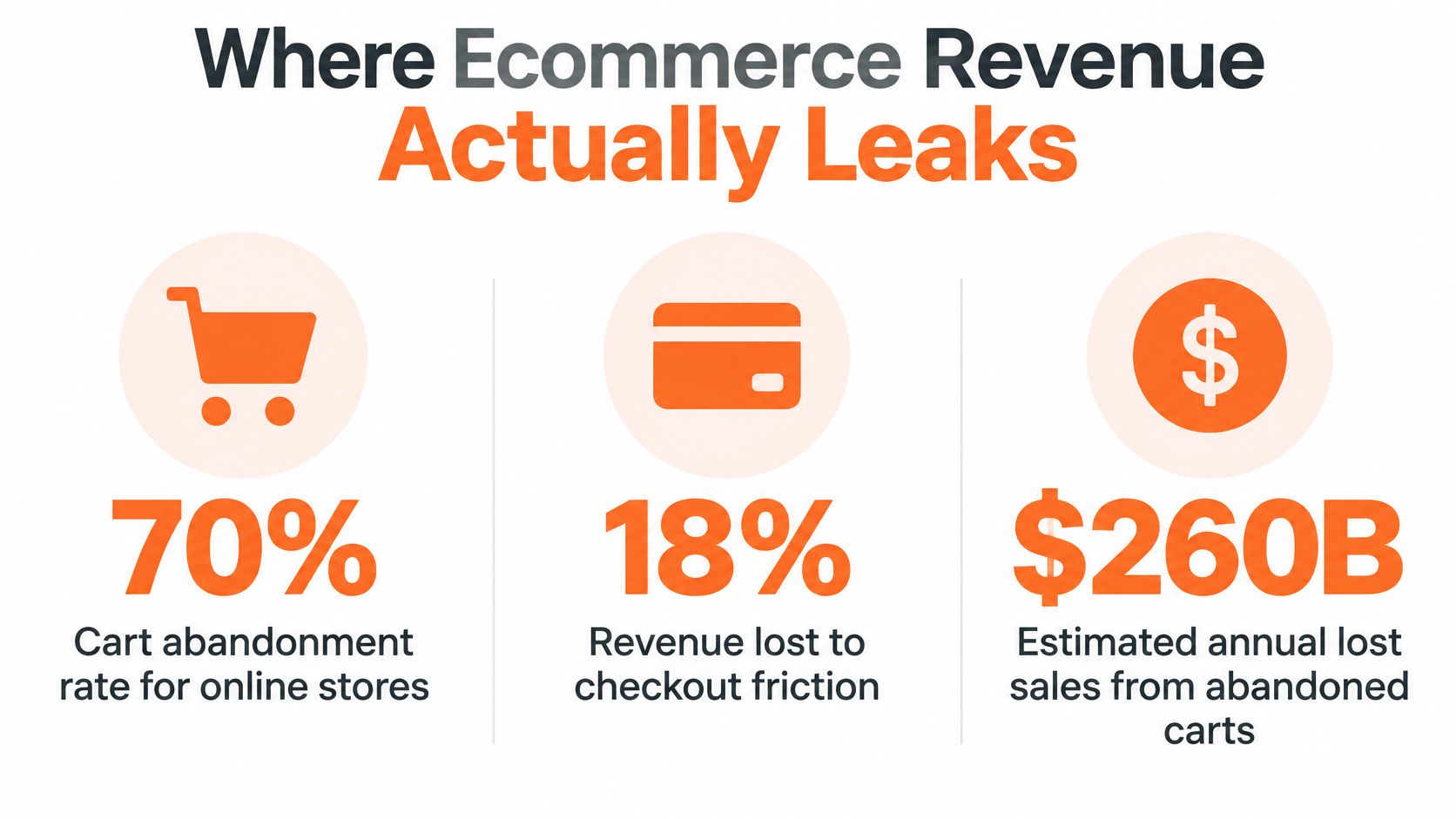
Baymard's analysis of 50 ecommerce studies found average documented cart abandonment of 70.22%. In its cited 2025 data, shoppers named extra costs such as shipping, taxes, and fees in 39% of checkout-related abandonment cases; slow delivery appeared in 21%, forced account creation in 19%, and a checkout that felt too long or complicated in 18%. Baymard's checkout research found that 65% of benchmarked checkout flows were mediocre or worse, and only 2% rated good. Its estimate says large ecommerce sites could gain 35% in conversion through checkout improvements alone.
That last figure deserves a caveat. It's a ceiling drawn from large sites, not a promise. Your actual gain depends on how rough your current flow is and how much traffic you already have to recover.
Fix the friction you can see
Start with the form itself. Baymard's form research puts an ideal checkout at about 12 form elements, compared with an average of 23.48 in U.S. checkouts, so ask for less, show costs sooner, and let people buy without an account. Baymard's checkout usability report breaks down where benchmarked flows fail if you want the field-by-field detail.
Ship a short sequence of tests:
- Show the full cost early: Make shipping and other charges visible before the final payment step.
- Make guest checkout easy to find: Don't require an account before someone can place an order.
- Cut unnecessary fields: Keep only what you need to fulfill and process the purchase.
- Make delivery timing clear: Use a promise your operation can meet, not an optimistic guess.
- Review checkout analytics: Track where shoppers leave and whether payment errors rise after a change.
Change one thing at a time so you can attribute the result to a specific fix. If you're also working on organic discovery, this guide to improving Shopify rankings can help you review how your pages connect. And keep stock decisions grounded in the cash they tie up, using this explanation of inventory carrying costs as a prompt to count storage and unsold goods in your calculations.
Returns, AI, and Other Advice Worth Questioning
A blanket free-returns policy can sound generous while making an early-stage store harder to run. In recent U.S. shipping research, 86% of retailers charged customers for shipping, usually $5–$10; the average customer-paid return fee was $10.92, and health and beauty returns averaged $16.36. Those figures don't tell you what your own policy should be. They do show why you need to understand the costs before copying a large retailer.

Put the return through your margin
For each product, count outbound shipping, return postage, inspection, repackaging, payment fees, and any discount needed to resell the returned item. Then compare those costs with gross margin and the likelihood that the customer will buy again. A returnable accessory in clean condition may be easy to resell; an opened personal-care product may not be.
Your policy can offer different paths: a paid return, an exchange, or store credit. Pick the option that fits the product and your operation. Track return reasons, too. Repeated complaints about fit or a mismatch between photos and the product call for a product fix, not a bigger returns subsidy. The underlying shipping figures come from parcelLab's ecommerce shipping study.
AI advice needs the same margin test. A 2025 survey of 1,205 entrepreneurs across six countries found that 70% estimated AI saved up to 10 hours a week, 44% said it reduced costs, and 48% said it reduced stress or burnout. Those are self-reported impressions, not proof that AI caused revenue or profit growth. A separate survey of 750 U.S. ecommerce leaders reported that 86% relied on AI extensively or somewhat in operations, while heavy users were more than twice as likely as light or nonusers to report improved profitability. That association doesn't prove the tool caused the improvement. The 2025 entrepreneurship survey is a reason to test carefully, not to automate everything.
Try one narrow workflow, such as sorting customer-service requests or cleaning bookkeeping records. Set a baseline for time, error rate, and rework; keep a person responsible for review. A practical rule: adopt a tool when it reduces a real cost or frees time you can use well. Stop when it adds errors or creates more support work.
For a visual walkthrough of the hands-on work involved, use the video below.
Legal, Tax, and Security Basics You Owe Yourself
Compliance can feel like paperwork until a late shipment, tax question, or payment issue lands in your inbox. Build a simple checklist and revisit it when your shipping promise, payment setup, or sales channels change.
Shipping promises
If you sell online in the United States and don't state a shipping period, the FTC's Mail, Internet, or Telephone Order Merchandise Rule requires a reasonable basis to believe you can ship within 30 days. If you miss your promised date or that default, tell the customer about the delay, give a revised date, and explain their cancellation and refund rights. For delays longer than 30 days, indefinite delays, or repeat delays, you need the customer's consent. Silence doesn't count. If the customer refuses, refund the full payment promptly. Keep your product pages and order emails consistent with your actual fulfillment process. Read the FTC's prompt-delivery guidance before you set the policy.
Records and card data
A payment app or marketplace may send Form 1099-K when payments for goods or services exceed $20,000 across more than 200 transactions, under the IRS threshold described in its guidance. The form doesn't decide whether income is taxable, and not receiving one doesn't remove your duty to report income. Keep records of sales, platform fees, refunds, shipping, and inventory. The IRS explanation of Form 1099-K makes clear why the form isn't a profit statement. For a broader view of the tax questions online sellers face, review this guide to taxation of electronic commerce.
PCI DSS Requirement 4.1 requires covered merchants to protect cardholder data as it travels across public networks. Correctly implemented SSL/TLS is one method the PCI Security Standards Council identifies. Use HTTPS, keep network access restricted between public-facing servers and internal systems, and let a payment gateway handle card details rather than passing unprotected data through your own systems. Use an AI legal assistant for business owners as a research aid if useful, but confirm legal decisions with a qualified professional.
Your First 90 Days as an Ecommerce Store Owner
A practical launch plan keeps you from trying to solve product, advertising, and fulfillment problems at once. Work in sequence. Pick one main question for each phase, record what you learn, and move on when you have enough evidence to make the next decision.
Weeks one and two
Talk to likely customers and examine competing offers. Ask what buyers struggle to find, what they already purchase, and what might stop them from ordering. Check supplier quality, minimum order terms, and delivery expectations before committing to deep inventory. Watch: whether customers show clear interest in the offer, not whether they praise your idea.
Weeks three and four
Build a small storefront with a focused product page, clear shipping and return terms, and a payment flow you've tested yourself. Place a test order, check the confirmation message, and walk through the fulfillment steps. Watch: whether a new visitor can understand the offer and complete checkout without your help.
Weeks five through eight
Bring in targeted traffic and test the page and checkout. Start with a manageable channel, such as a small paid campaign or direct outreach to a relevant audience. Don't change the product, creative, price, and checkout at once, or you won't know what affected the result. Watch: completed orders in relation to visits and acquisition costs.
Weeks nine through twelve
Tighten fulfillment, review customer questions and returns, and ask early buyers what would bring them back. Build a repeatable routine for ordering stock, shipping purchases, recording expenses, and following up. Watch: whether customers return or refer someone, and whether each sale leaves enough money after costs.
Progress can feel lonely when friends see a storefront and assume the hard part is over. Peer groups can help you compare supplier notes, talk through a return-policy decision, and catch blind spots before they get expensive.
If you're building a product or ecommerce brand in Chicago or the Midwest, Chicago Brandstarters is a free, vetted founder community with private dinners and a group chat for sharing operator questions, supplier knowledge, and honest lessons. Visit the community to meet other builders and get support as you turn your first store into a business.
Leave a Reply