

The popular ecommerce SEO advice starts too late: find keywords, write descriptions, publish blog posts. If your filters lead to empty shelves, your search misses familiar synonyms, and your product feed contradicts your checkout, more copy won't fix the store. A useful ecommerce SEO strategy treats discovery as merchandising, then judges the work by revenue.
You don't need to rebuild everything at once. Start with the page a shopper should reach, repair the paths to that page, and make the product information trustworthy before you spend heavily on content or links.
Map Search Terms to the Right Page
A shopper searches for sneakers for flat feet. Your catalog calls the relevant line Stability Series 4. If nothing on the page connects that customer language to the products, you're asking shoppers to learn your naming system before they can buy. That is a merchandising miss, not a keyword gap.
Start with query-to-page mapping. Give each search cluster one destination that matches the shopper's intent and the assortment you can fulfill.
Which page type targets which search intent
| Page type | Target intent | Example query |
|---|---|---|
| Category page | Broad buying intent | running shoes |
| Product page | Exact model or variant | Brooks Ghost 16 women's |
| Filtered landing page | Attribute plus a need, with enough products and demand to justify a page | waterproof winter boots |
| Buying guide | Comparison or question | best trail running shoes for wide feet |
These destinations do different jobs. A category helps shoppers choose from an assortment; a product page helps them evaluate one item. A buying guide should resolve a decision that a grid alone cannot. A filtered page earns a URL only when the attribute combination has enough stock and commercial demand to support it. Otherwise the filter belongs in navigation or site search, where it can still help shoppers without becoming a thin page you have to maintain.
Collect language before choosing keywords
Follow this sequence before you commission page copy:
- Export 90 days of queries from Search Console. Include clicks, impressions, average position, and landing page. Separate branded searches from product-type and problem-based searches so existing brand awareness doesn't hide gaps.
- Pull the top on-site search terms from your analytics. Keep the original wording, including misspellings and phrases your search engine handles poorly. Add zero-result queries to the same sheet; they show where your catalog vocabulary and customer vocabulary part ways.
- Add language from reviews and autocomplete. Look for fit complaints, intended uses, materials, compatibility questions, and the words customers use to describe the outcome they want.
- Group terms by intent. Keep phrases together when the same page could satisfy the shopper, rather than grouping everything that contains the same noun.
- Assign one primary URL to each cluster. Record whether you'll improve an existing page, create a new destination, or leave the opportunity alone because your assortment can't satisfy it. A new landing page carries design, development, and content cost, so reserve it for clusters with enough products and demand to justify the work.
Grumspot's guide to keyword strategy for DTC stores offers a worksheet for turning that vocabulary into a practical page map.
Related words do not mean identical needs. Someone comparing wide-fit trail shoes wants selection guidance; someone searching for an exact model wants price, stock, and a purchase path. Sending both people to the same general collection adds clicks and makes it harder to tell which page is doing the work.
Check the catalog against the shopper's vocabulary
Shoppers often struggle to find products when catalog wording differs from their search terms. Your own site search data, zero-result reports, and support questions show whether that is happening in your store. Treat those signals as a reason to inspect product discovery, not as a forecast of abandonment.
Create a shared vocabulary sheet for whoever manages merchandising, customer support, and SEO. Record the customer phrase, your preferred catalog term, relevant attributes, and any synonyms your search system needs.
Practical rule: Keep your branded product names, but don't make shoppers know them before they can find what you sell.
Check whether your products meet the need before assigning them to a cluster. Don't label ordinary boots waterproof merely because the phrase attracts searches. Accurate attributes matter more than an ambitious keyword list, and inaccurate ones create returns after the sale.
Finish by listing your top 20 query clusters beside the URL that currently ranks for each. Flag missing destinations, competing pages, and mismatches between the search and the assortment. That list becomes your working backlog.
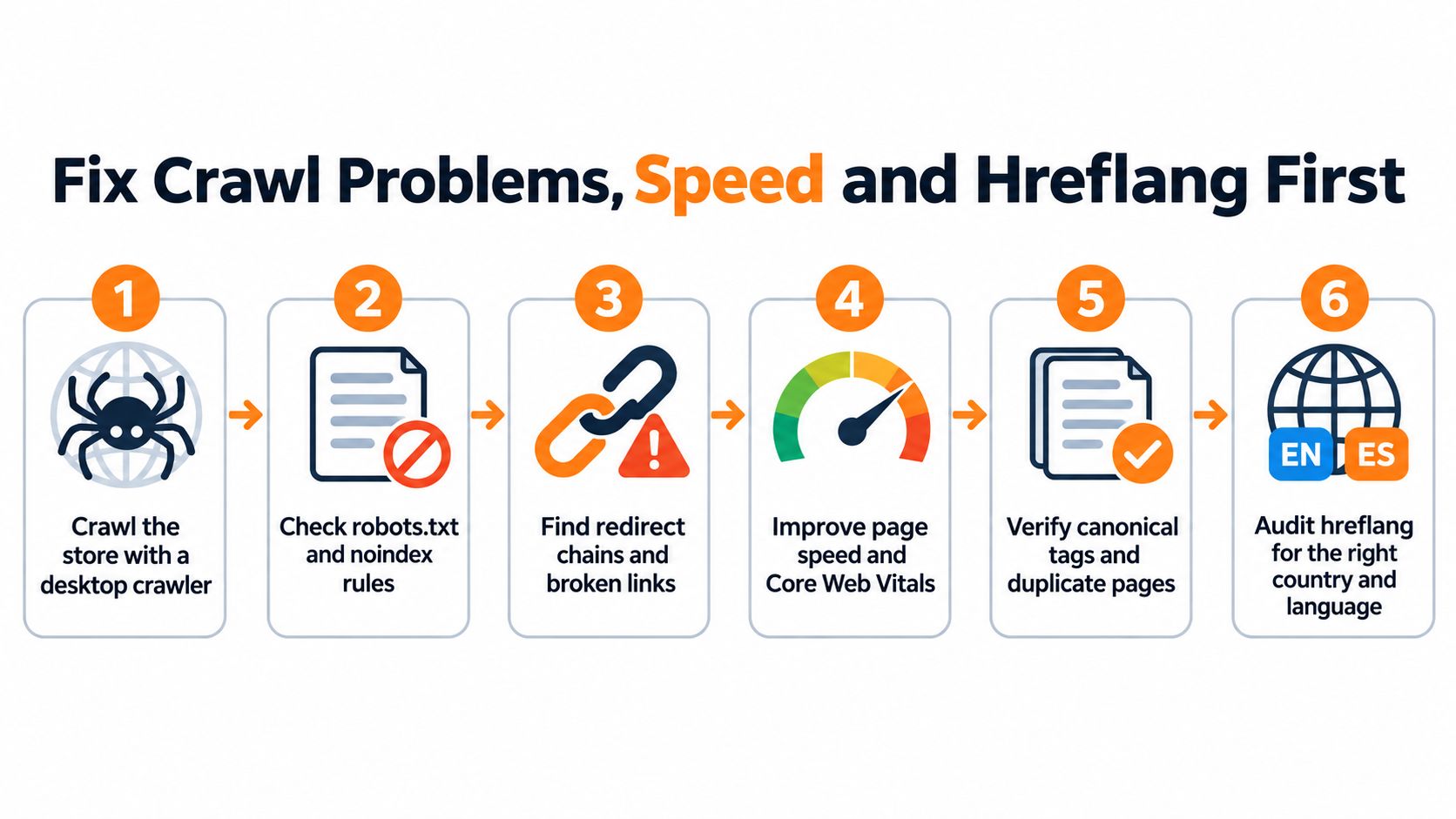
Fix Crawl Problems, Speed and Hreflang First
Fix access problems before paying for more writing. A polished description on an orphan product page is like a well-stocked aisle behind a locked door.
Start with a crawler, Search Console, and access to your theme or development team. Don't buy another SEO app until you know which problem it will solve and whether an existing app already controls the same setting.
Repair the paths shoppers and crawlers use
- Crawl the store with a desktop crawler. Use Screaming Frog or Sitebulb, then export status codes, redirect chains, orphan pages, and duplicate titles. Connect analytics and sitemap data where possible so you can find pages that the crawler can't reach through navigation.
- Check
robots.txtand your noindex rules. Allow access to product images, CSS, and JavaScript that Google needs to understand your pages, and remove accidental noindex directives from commercial destinations. - Give pagination a usable structure. Use distinct URLs like
/shoes?page=2, normal HTML<a href>links to subsequent pages, and a self-referencing canonical on each page, following Google's pagination guidance. Don't canonicalize every page to the beginning of the collection, because that confuses the identity of later product sets and weakens their discovery paths. - Choose a consistent variant URL pattern. Use
/t-shirt/greenor/t-shirt?color=greenconsistently when you reference the variant; where a parameter only selects an option and you prefer the main product URL, omit that parameter from the canonical as Google's ecommerce URL guidance recommends. - Measure Core Web Vitals on the category template first. Inspect loading, layout movement, and filter responsiveness with PageSpeed Insights and browser tools, then compress images and lazy-load those below the fold. Don't lazy-load the main image shoppers need immediately.
- For international stores, add reciprocal hreflang annotations and an appropriate
x-defaultdestination. Match equivalent country or language pages, and check return annotations so you don't send conflicting signals about which version belongs to which audience.
Use this visual checklist when you review technical work with your developer.
Spend development time where it reaches the catalog
A template repair can improve every URL that uses it. A manual patch fixes only the page you touched. Prioritize shared navigation, product-card links, image handling, and canonical generation before polishing isolated pages.
For help separating revenue risks from cosmetic warnings, use Up North Media's guide to technical SEO fixes that protect sales as a discussion checklist. Give each issue an affected template, a business consequence, an owner, and a test for completion.
Keep the trade-offs explicit. Heavy compression can blur product details. Removing scripts can break reviews or variant selection. Test the shopping journey after performance changes instead of celebrating a better score while the buy button fails.
You want a clean crawl with no redirect chains, direct internal links to preferred destinations, and a sitemap containing only indexable URLs. Re-crawl after deployment, because a completed development ticket doesn't prove that the live store behaves correctly.
Decide Which Filtered Pages Get Indexed
| Filter combination | Index it? | Reason | Action |
|---|---|---|---|
| Category plus one attribute with search demand, such as waterproof winter boots | Yes, if stock and unique copy exist | Searchers use the phrase and the products match it | Keep indexed with a short buying intro |
| Color filter on a single product line | No | Near-duplicate of the parent page | Canonical to the parent page |
| Size filter alone | No | Low search demand and many sold-out results | Keep it internal only |
| Two or more filters with no stock | No | Repeated dead ends for shoppers | Noindex until restocked |
| Sort orders such as price low to high | No | Same products in a different order | Canonical to the base page |
Use these as starting decisions for the situations described, not universal judgments about every color or size query. A color collection with distinct demand and a useful assortment deserves a different assessment from a color toggle on a single product line.
Require demand, stock, and a reason to visit
Treat each candidate as a merchandising proposal. The selective approach in Hashmeta's ecommerce SEO guide supports evaluating filtered pages through demand, assortment, distinct content, availability, and commercial performance rather than applying a blanket rule.
Require these tests before you create an indexable destination:
- Stable search demand: Find recurring interest in the specific combination, rather than assuming every selectable attribute deserves a page.
- Enough available products: Give shoppers a meaningful choice. Check availability across relevant sizes or variants, not merely whether the parent products remain active.
- Distinct buying help: Explain the selection criteria, limitations, or use case. Swapping an adjective in the parent category's introduction isn't enough.
Say you sell women's waterproof winter boots. That destination can help shoppers if you stock suitable products and explain waterproof construction, warmth, fit, and traction accurately. It becomes a poor destination when shoppers repeatedly reach a grid of unavailable options.
A filter earns an indexable page when you can fulfill the shopping need behind it.
Keep useful filtering available even when you don't want a separate search landing page. Control URL generation and internal linking so shoppers can narrow an assortment without exposing every possible combination as a crawlable destination.
Review the portfolio against revenue
Keep sort orders out of your indexation plan. Reordering an assortment doesn't create a new buying need, so consolidate those URLs toward the base page.
Don't treat canonical tags, noindex, and crawl blocking as interchangeable switches. Google must crawl a page to read its noindex directive, while a canonical expresses your preferred version of substantially similar content. Choose the mechanism that matches the problem.
Each quarter, export your indexed filtered URLs and compare impressions, clicks, conversion rate, revenue per visit, and out-of-stock frequency. Investigate crawl activity and duplicate signals where you can access them.
Promote combinations that show search demand and commercial usefulness. Improve or consolidate pages that attract visits without satisfying the shopper. Avoid automatic removal after a temporary stock interruption when a reliable replenishment plan supports keeping the destination useful.
Add Product Structured Data Google Can Verify
Treat structured data as a machine-readable version of your product information. Don't let a theme, review app, and feed integration each invent their own version of the same product.
Google's ecommerce structured-data guidance recommends combining on-page markup with a Merchant Center feed to support eligibility and help Google verify product information. Build both from a controlled catalog source wherever your platform allows it.
Check the mobile shopping experience alongside the underlying product information.

Implement and validate the catalog rules
- Define a preferred canonical URL for every purchasable product. Document how you handle meaningful variants, selected options, and duplicate collection paths. Don't create competing canonical rules across your theme and apps.
- Add
Productmarkup with the name, image, SKU, price, currency, availability, shipping, and return-policy information. Include review information only when you have real, eligible reviews that shoppers can inspect. - Connect variants through
ProductGroup. AddvariesBy,hasVariant, andproductGroupIDto the parent group, then describe each variant withProductmarkup, following Google's product-variant documentation. Keep the required core product properties; grouping doesn't replace them. - Put a direct
Offeron each purchasable product page and maintain an unambiguous active price. Under Google's merchant-listing rules, Google usesoffers.priceand ignores a competing price insidepriceSpecification, so inspect both fields during schema migrations. - Validate representative URLs with Google's Rich Results Test. Sample each template and important product state, including sale items, unavailable products, and variant selections. Inspect the rendered markup rather than trusting the theme settings screen.
- Compare the schema with the feed and the visible page. Check currency, selected variant, availability, shipping terms, and returns alongside the price, then repeat those checks after catalog imports or app changes.
Decide who owns each field. Your merchandising team might manage availability while operations maintains delivery and return rules. Give someone responsibility for checking that the systems publish the same information.
Catch the failures that survive installation
- Stale availability: Update the page, markup, and feed when stock changes so shoppers don't reach an unavailable product from a misleading listing.
- Price mismatches: Check sale schedules, currency settings, and cached markup when the visible amount differs from the schema.
- Missing variant identifiers: Preserve stable identifiers through imports so you can connect each option to the right parent and purchasable item.
Structured data supports eligibility and understanding, not a ranking guarantee. Don't promise a rich appearance merely because a testing tool reports valid markup.
Check Search Console's Merchant listings and Product snippets reports each month. Review invalid items, investigate warnings that affect your catalog, and reconcile issues with Merchant Center diagnostics. Keep a change log so you can connect new errors to releases instead of repeatedly reinstalling schema apps.
Write Product Page Copy That Ranks and Converts
- Title tag: Name the product type and a defining attribute, alongside the model where relevant.
- Primary heading: Use a clear H1 containing the main product or category term.
- Buying introduction: Write 100 to 150 words explaining who the product fits and how it differs from nearby alternatives, without padding the page to hit the range.
- Image descriptions: Describe the product type and visible details in alt text; don't repeat a keyword list.
- Internal paths: Link naturally from categories, breadcrumbs, and relevant buying guides using descriptive anchors.
Use a two-stage approach: earn a qualified visit, then remove the obstacles to buying. A perfectly targeted page still wastes the visit when shoppers can't establish fit, delivery timing, or the full cost.
Answer the questions that block a purchase
Write from the product outward. Explain dimensions, materials, care, compatibility, sizing, and limitations using accurate catalog information. Translate technical details into buying consequences without inventing benefits.
For a wide-fit running shoe, explain the available width options and how the fit differs from your standard option. Don't claim that it prevents pain or suits a medical condition unless you have appropriate support for that claim.
Manufacturer copy creates identical descriptions across reseller sites when everyone republishes it. Preserve factual specifications, but add your own selection guidance, comparison photography, fit notes, and answers to actual customer questions.
Copy test: If a shopper could replace your product name with a competitor's and keep every sentence, rewrite the description.
On category pages, keep the route to products clear. Put concise selection guidance near the top and move detailed explanations where they won't bury the assortment. More text doesn't automatically create a better destination.
Fix the template around the words
Baymard's product-page UX assessment found that only 48% of leading US and European desktop ecommerce sites achieved a decent-or-better score, compared with 38% on mobile; Baymard also reports that 17% of surveyed US online shoppers abandoned an order because checkout felt too long or complicated.
Inspect your mobile template with a real buying task. Select a variant, check delivery, add the item, and proceed through checkout. Watch for hidden selectors, moving controls, unclear error messages, and information that disappears into collapsed panels.
- Show the likely total: Put price and relevant shipping or tax explanations near the buy button.
- Explain delivery: Show an achievable delivery date or estimate, and state any location assumptions.
- Reduce checkout work: Allow guest checkout and remove fields you don't need to fulfill the order.
- Make returns easy to find: Place a concise summary above the fold and link to the full policy.
Use our guide to Shopify conversion rate optimization when turning those observations into testable changes.
Test one template change at a time and compare conversion rate against your baseline. Segment mobile and desktop results, then inspect add-to-cart and checkout completion to understand where the change helped or hurt. Keep traffic quality, promotions, and stock changes in view before assigning credit to the copy.
Earn Links and Publish Content Shoppers Cite
Plan for two discovery paths: conventional search results and shopping assistants that use product information to answer buying questions. Keep crawlable editorial pages for the former and dependable catalog data for product-led discovery.
Google states that AI Overviews and AI Mode have no extra technical eligibility requirements, while its shopping discovery explanation describes discovery through product attributes. Don't pay for an AI-specific technical overhaul without a concrete problem to solve.
Bring merchandising and content decisions into the same planning conversation.

Publish comparisons you can defend
Keep product names, identifiers, prices, inventory, shipping, returns, reviews, and variant attributes consistent across your website and merchant feeds. Assign updates to named owners rather than asking a content writer to correct operational discrepancies manually.
For a small catalog, I'd start with three to five comparison or use-case pages. Choose decisions close to purchase: which shoe suits wide feet, which material tolerates frequent washing, or which accessory fits a specific product.
State the trade-offs. Explain who should choose each option and who should avoid it. Use actual measurements, supported specifications, original photos, and a clear route to available products.
You don't need a generic article for every related keyword. You need useful answers that a shopper can act on and another publisher can reasonably cite.
Use this video as a separate learning resource while planning the work.
Ask for links where the relationship makes sense
Start with legitimate commercial relationships rather than cold pitches to unrelated websites.
- Manufacturers and suppliers: Ask whether they maintain stockist pages or customer resources where your store belongs.
- Real buyers: Request honest reviews without scripting praise or making rewards conditional on a positive rating.
- Niche publishers: Pitch a useful sizing, installation, or care guide that answers a recurring audience question.
- Chicago and Midwest partners: Approach relevant events, suppliers, and local press with a specific resource or story, rather than asking for a link without context.
You can also publish original findings from your own sales, including return patterns by product type. Explain your sample and limitations, protect customer privacy, and avoid turning a small dataset into a claim about the entire market.
Keyword Kick's guide to backlink building sites can help you investigate prospecting options. Evaluate each opportunity for audience fit and editorial standards; don't treat inclusion in a directory of tools as an endorsement of every placement.
Avoid paid link packages. You can control the invoice, but you can't assume the resulting pages will send relevant shoppers or justify the risk.
For broader catalog-led publishing ideas, use our guide to building an ecommerce blog. Finish your outreach plan by listing five relevant link targets to contact in the next 30 days, the resource you'll pitch, and the person responsible.
Measure Organic Revenue and Pick Your First Fixes
| KPI | Where to find it | What it tells you |
|---|---|---|
| Non-brand organic clicks | Search Console Performance report | Whether rankings pick up for product and category terms |
| Indexed filtered URLs | Index coverage report | Whether the filter policy holds |
| Rich result coverage | Search Console product enhancement reports | Whether structured data is eligible |
| Organic conversion rate by template | Analytics landing page report | Whether ranking gains turn into sales |
| Revenue per organic session | Analytics grouped by landing page | Which templates earn money |
| Site search no-result rate | Site search report | Missing products, synonyms or attributes |
Record a baseline before changing the store. Group landing pages into categories, products, filtered destinations, and editorial content so you can distinguish a template problem from a store-wide change.
Turn reporting into decisions
Compare non-brand clicks before and after template changes using comparable periods. Check impressions and query mix alongside clicks, because a new informational audience can increase traffic without increasing buying intent.
Audit indexed filtered URLs against your approved list. After schema releases, inspect product-report errors and eligible items rather than assuming successful deployment means successful processing.
Compare conversion rate and revenue per organic session by landing template. Verify purchase tracking before trusting the result; use our Google Analytics beginner's guide if you need help establishing the reporting foundation.
Review no-result searches monthly. In Baymard's benchmark of leading US ecommerce sites, 70% failed to return all relevant results, or any relevant results, for synonym searches. Test your own customer vocabulary rather than assuming an installed search app handles it.
Distinguish missing products from missing matches. If you stock the item, correct synonyms or attributes; if you don't, assess the demand before expanding the assortment. A repeated search can justify better navigation or guidance without requiring a new product.
Pick a manageable starting scope
- Fix crawl errors in the first two weeks. Prioritize blocked commercial pages, broken internal links, and redirects that interfere with discovery.
- Add structured data to the 20 best-selling products. Use this controlled batch to test your implementation before extending it across the catalog.
- Rewrite titles and introductions for the top 10 category pages. Choose pages with relevant demand and dependable inventory, then record exactly what you changed.
Review each change after 60 days against its recorded baseline. Treat that as a review checkpoint, not a promised result date, and account for seasonality, promotions, availability, and deployment timing.
Our community brings together kind, bold, hard-working Chicagoans and Midwesterners who are starting brands. Once members reach 7 figures, we encourage them to apply to EcomFuel and Million Dollar Sellers.
Keep the next decision concrete: continue the test, correct a failure, or move resources to a better opportunity. A dashboard helps only when you use it to choose the work.
At Chicago Brandstarters, we provide a free, vetted community where founders share honest tactics and support through private dinners and an active group chat. Bring your page map, technical backlog, or organic revenue questions to conversations with other brand builders. Visit Chicago Brandstarters to learn about joining and building alongside kind, hard-working founders across Chicago and the Midwest.
Leave a Reply