

Shopify is the best ecommerce platform for most small businesses in 2026 because it balances launch speed, app ecosystem, and predictable costs. Shopify leads the U.S. market at about 29% share with roughly 4.6 million active stores, and you should leave it only when you need deep catalog customization or already have WooCommerce experience.
The popular advice says to compare every platform feature by feature. That approach wastes your time. A solo founder in Chicago, a family-run manufacturer in Wisconsin, and a small B2B supplier in Indiana don't work the same way, so they shouldn't choose software from the same checklist.
You need a platform that gets you to a first sale quickly, keeps your monthly burn understandable, works well on your phone, and doesn't turn every small change into a developer project. Shopify is my default recommendation. WooCommerce and BigCommerce make sense in specific situations, while Wix and Squarespace suit simpler branded stores with lighter operating needs.
Why Best Means Best Fit
The platform with the most buttons rarely wins for a small business. Extra controls can create extra setup work, more maintenance, and more ways for a checkout, payment method, or inventory sync to fail.
I judge the best ecommerce platform for small business against four practical tests:
- Speed to first sale: You should move from product idea to working checkout without building custom infrastructure.
- Cost clarity: You need to understand subscription, payment, app, hosting, and maintenance costs before they accumulate.
- Daily operating fit: You should manage orders, products, inventory, and customer messages from the devices you use every day.
- A usable support path: You need documentation, support, or a partner who can solve ordinary problems without a long technical detour.
Your niche matters because a handmade candle seller, a subscription food brand, and a regional equipment supplier face different catalog and fulfillment demands. Use this guide to finding your niche market before you compare platforms. A sharper offer makes platform decisions easier because you know what you need to sell, who buys it, and which sales channels matter.
Choose outcomes over software checklists
A platform earns its place when it removes work from your week. Hosted tools such as Shopify handle hosting, security maintenance, checkout infrastructure, and much of the technical upkeep for you. WooCommerce gives you more control, but you take responsibility for hosting, updates, plugins, backups, and performance decisions.
That tradeoff resembles choosing a commercial kitchen. A shared kitchen limits how much you can remodel, but you can start cooking quickly. A private kitchen gives you control over every pipe and appliance, but you also fix every leak.
Practical rule: Pick the platform that removes the most work you don't want to own.
Mobile management matters for founders who pack orders from a garage, attend markets, or run a business beside a full-time job. Current platform coverage describes mobile apps that manage products, orders, inventory, and payments, along with AI tools for store design, product listings, marketing, and customer engagement. Fit Small Business' ecommerce comparison also covers how cart-recovery tools depend on a store emitting an abandoned-cart event. That detail matters if you sell through single checkout links, social commerce, or a small set of products instead of a traditional catalog.
The Market Is Easier Than It Looks
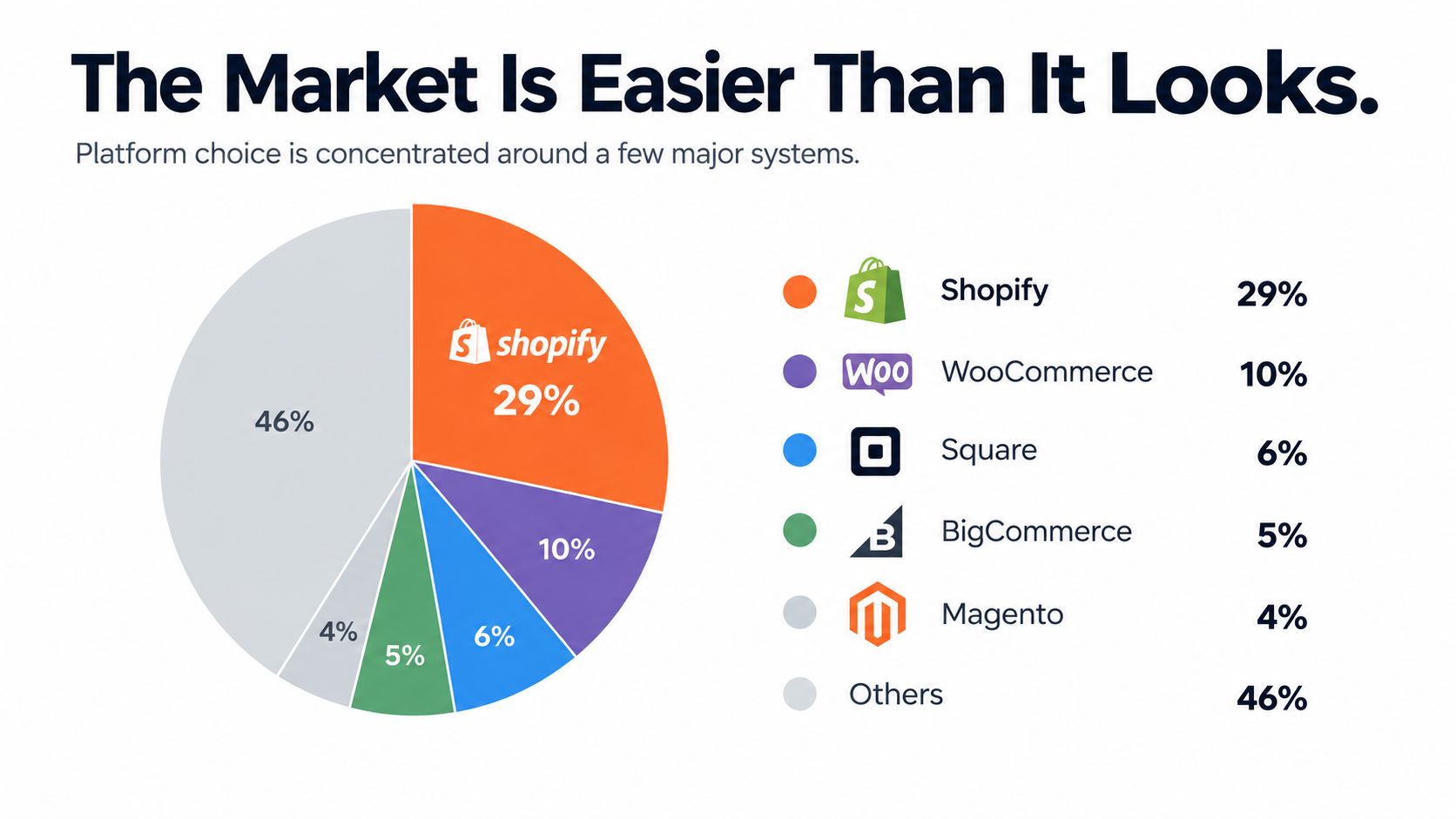
You don't need to evaluate every ecommerce product on the internet. The market already concentrates around a small group of mainstream systems, which gives small businesses a practical shortlist.
Shopify holds about 29% of U.S. ecommerce platform share and roughly 4.6 million active stores, while WooCommerce holds about 18%. Wix holds about 5% to 7%, depending on the dataset. You can review the underlying market summary in this North American ecommerce platform analysis.
Why concentration helps you
Among smaller merchants below roughly $500K in revenue, Shopify holds an estimated 35% share, compared with about 30% for WooCommerce, according to the same market summary. Another market analysis says five platforms account for more than 75% of the market.
That concentration isn't a limitation. It narrows your research to tools with mature app ecosystems, established support paths, hosting options, payment connections, and experienced freelancers. You still need to choose carefully, but you don't need to gamble on an obscure system that only one local developer understands.
The history of ecommerce helps explain why hosted platforms became so common. The National Science Foundation lifted its ban on commercial internet use in 1991, SSL arrived in 1994, and Amazon and eBay both launched in 1994. Shopify began after Tobias Lütke and Scott Lake tried to sell snowboarding equipment online and then built a store platform for sellers who didn't want to create everything from scratch. BigCommerce's ecommerce history guide documents that progression.
Narrow your shortlist
For most Midwest founders, start with Shopify, WooCommerce, and BigCommerce. Add Wix or Squarespace when design and simple selling matter more than advanced catalog operations. Consider a more complex system only when your current requirements prove that a mainstream platform can't handle them.
You can also build demand outside your store through email, search, events, and text messaging. If SMS belongs in your launch plan, review affordable SMS for SMBs while you check whether your chosen platform can pass customer and order data into that workflow.
This video gives another way to think about the difference between a hosted store and a more configurable setup.
The sensible move is simple: shortlist the dominant tools, map each one to your operating habits, then test the checkout and integrations before you commit.
Platform Contenders for Small Brands
Shopify, WooCommerce, and BigCommerce solve different founder problems. Shopify removes technical work, WooCommerce gives WordPress users control, and BigCommerce puts more commerce capability into the core platform.
A 2026 comparison rated Shopify at 5.9 overall, ahead of Squarespace at 5.6 and BigCommerce at 5.5. The same comparison rated Shopify best for pricing and payment-processing access while keeping it competitive for features and support. See the Forbes Advisor ecommerce platform comparison for that review.
| Platform | Launch Speed | Ecosystem Depth | Cost Clarity | Best For |
|---|---|---|---|---|
| Shopify | Fast | Very deep | High at the start, less simple as apps stack up | Solo founders and small teams that want a quick launch |
| WooCommerce | Moderate | Deep | Variable because hosting, plugins, and maintenance sit outside the core platform | WordPress owners and developers who want code-level control |
| BigCommerce | Moderate | Broad, with more native commerce tools | Clearer core scope, with plan changes to monitor as sales grow | B2B sellers, wholesale operators, and complex catalogs |
Shopify for the fastest path
Choose Shopify when you want to reach a first sale without managing hosting, security patches, or plugin maintenance. Its mobile-friendly themes, integrated checkout, and app ecosystem let you start with a standard store and add tools as your operation develops.
That convenience has a tradeoff. Your store may rely on several paid apps for subscriptions, returns, shipping, reviews, or advanced merchandising. Each app adds cost and another connection to maintain, so keep your first version lean.
For a new brand, Shopify is the safest default because it reduces the number of technical decisions you need to make before launch. If you're comparing marketplaces with your own store, Readymerce's store launch advice can help you think through that choice.
WooCommerce for control
WooCommerce fits a founder who already runs WordPress and understands the responsibility that comes with flexibility. You can shape the catalog, content structure, checkout, data model, and integrations around your operation rather than adapting everything to a hosted platform's limits.
That freedom comes with more ownership. You need to select hosting, keep plugins compatible, manage security and backups, tune performance, and decide who handles technical problems. A developer or technically confident operator can make that worthwhile. A solo founder who wants to edit a product from a phone during a weekend market may find the upkeep distracting.
BigCommerce for native commerce depth
BigCommerce fits an operator who needs stronger native tools for wholesale, B2B, catalog rules, promotions, or more involved selling workflows. You may need fewer apps than you would on Shopify, which can make the store easier to govern once the catalog grows.
The interface may feel less immediate for a founder who wants to move quickly, and deeper customization can require technical help. I would choose BigCommerce when the requirements already point toward B2B or complex catalog work, not because the platform has a longer feature list.
Decision rule: Choose Shopify for speed, WooCommerce for control, and BigCommerce for built-in complexity.
Real Monthly Cost and Hidden Fees
A platform's advertised plan is only the starting point. For a small business, the actual monthly cost appears after you add the services required to operate, process orders, and maintain the store.
Budget for a domain, SSL, premium theme, apps or plugins, hosting, payment processing, developer support, and platform transaction fees. Individual apps and plugins can cost $10 to $50 per month each. Merchants that use a payment provider outside the platform's preferred system may also pay an additional 0.5% to 2% per sale, according to BigCommerce's small-business ecommerce cost guide.
Run the payment math first
Shopify lists third-party transaction fees of 2% on its lowest tier, 1% on the next tier, 0.6% on the third tier, and 0.2% on the highest tier shown when you use a third-party payment provider instead of Shopify Payments. Check the current Shopify pricing details before selecting a plan because Shopify can change fees and plan terms.
Shopify says Shopify Payments has no monthly fee or setup fee. Shopify also does not charge third-party transaction fees on orders when Shopify Payments is your sole payment provider. You still pay the card rate and store subscription. The Shopify Payments cost explanation explains the difference between those charges.
For online sales, Shopify's payment guide lists rates from 2.5% to 2.9% plus 30¢ per transaction, depending on the plan. For in-person card sales, it lists starting rates of 2.6% plus 10¢ on Basic, 2.5% plus 10¢ on Grow, and 2.4% plus 10¢ on Advanced. Use the Shopify credit card processing guide to model your own order mix.
A Midwest founder comparing owned-store costs with marketplace selling should also review this breakdown of the cost of selling on Amazon. Marketplace fees and recurring store expenses affect margins in different ways, so compare the full operating bill rather than the entry price.
Build three cost scenarios
Use your expected monthly sales, average order value, payment provider, product count, shipping tools, email system, and required apps. Then calculate:
- Fixed costs: Subscription, hosting, domain, theme, and necessary software.
- Variable costs: Card processing, platform transaction fees, shipping tools, and order-based services.
- People costs: Your time, contractor help, maintenance, and troubleshooting.
Squarespace shows why subscription price alone can mislead. Shopify's small-business pricing article says Squarespace plans range from $16 to $99 per month, while the lowest tier charges 2% on regular products and 7% on digital content and memberships. It says those fees fall to 0% and 5% at the $23-per-month plan. Review Shopify's small-business platform pricing article for that comparison.
WooCommerce may look inexpensive because its core software is free, but hosting, extensions, security, backups, and maintenance still create costs. A lower entry price does not guarantee a lower operating cost.
Performance That Moves Sales
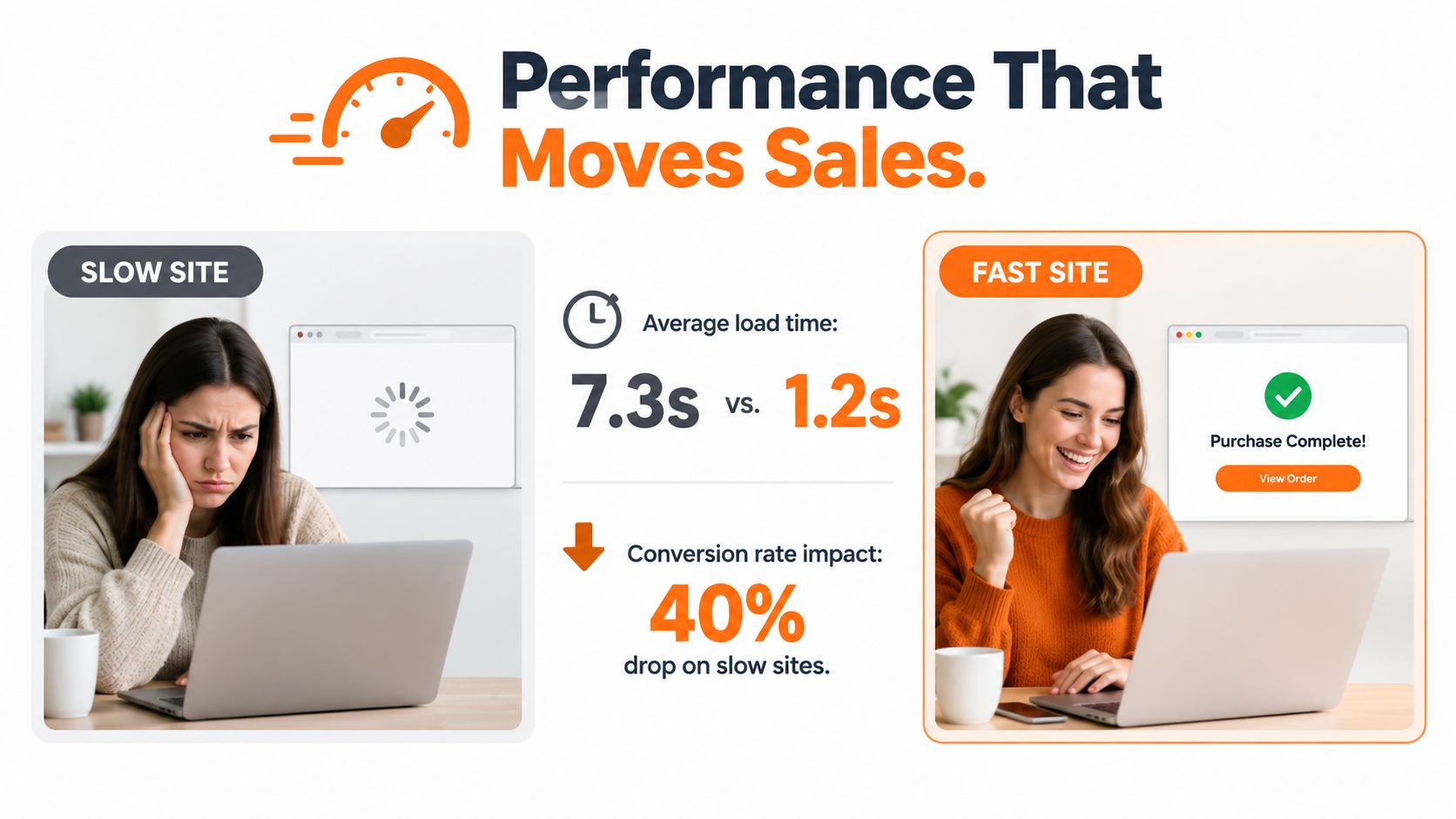
Your store can have a beautiful theme and the right product strategy, then lose shoppers because pages take too long to load. Hosting architecture, image size, app scripts, theme code, and tracking tools all affect the customer experience.
A 2026 platform test found one group of sites averaged 7.3 seconds of total load time with a 3.6-second Largest Contentful Paint. Three sites hosted with Hostinger averaged 3.6 seconds of load time and a 1.3-second LCP. Another platform group averaged 16.8 seconds, with one site exceeding 22 seconds and average LCP reaching 5.19 seconds. Review the Hostinger ecommerce platform test for the test results and methodology.
Test the store you will actually run
Don't judge speed from a blank demo store. Add your real product images, collection structure, reviews, analytics, chat, email popups, and shipping tools. Test from a phone over a normal mobile connection, then check the product page, cart, checkout, and confirmation page.
Use this simple test:
- Open the homepage: Check whether the first meaningful content appears quickly.
- Open a product page: Watch image loading, variant selection, reviews, and add-to-cart behavior.
- Run a checkout: Confirm that payment, address fields, shipping rates, and confirmation work without delay.
- Repeat after integrations: Retest after you install apps because scripts can change performance.
Shopify gives you managed hosting, which makes speed easier to govern for a small team. WooCommerce can perform just as well when someone chooses capable hosting, keeps plugins disciplined, compresses images, and monitors the site. A poorly maintained WooCommerce build can outrun neither a well-tuned hosted store nor a patient shopper.
Match speed work to your stage
A founder validating one product doesn't need a custom performance project. Choose a lightweight theme, compress photos, limit apps, and measure the actual customer path. A growing catalog needs tighter control over filters, scripts, search, and third-party connections.
Use this Shopify conversion rate optimization guide as a practical reference when you improve product pages and checkout. Performance helps only when customers can understand the offer and complete the purchase.
How to Pick the Right Platform
Use your operating model to decide. The same software can feel effortless to one founder and frustrating to another because the work behind the store differs.
Start with the founder, not the platform
Choose Shopify if you want the safest path from idea to first sale, you don't want to manage hosting, and you expect to use apps as your needs expand. This fits a Chicago maker selling a focused product line, a Midwest food brand building direct sales, or a solo operator testing demand beside a full-time job.
Choose BigCommerce if wholesale pricing, B2B accounts, catalog rules, or built-in commerce functions already shape your plan. A regional distributor with different buyer groups may prefer more native capability over Shopify's smoother starting experience.
Choose WooCommerce if your company already runs on WordPress and you or your partner can manage the technical stack. A content-led brand with custom landing pages, a specialized catalog, and a trusted WordPress developer can gain more from control than from a fully managed platform.
Wix and Squarespace can work for a small catalog, a service business with products, or a creative brand that treats the website as the main brand experience. Move up to a commerce-first platform when catalog rules, fulfillment, wholesale, or integrations begin to dominate your daily work.
Check the operating details
Current ecommerce platforms market AI assistance for store design, product listings, marketing, and customer engagement. They also provide mobile tools for products, orders, inventory, and payments. Treat those tools as time savers, not reasons to buy a platform without testing the underlying workflow.
Cart recovery deserves special attention. A recovery system usually needs the platform to emit an abandoned-cart event. If your business sends one checkout link through social media or sells through a very lean flow, that automation may not trigger.
Before you pay, confirm these three integrations:
- Payments: Test your preferred provider, refunds, disputes, and in-person selling if you attend markets.
- Fulfillment: Confirm that orders, shipping status, inventory, and returns move cleanly between systems.
- Customer communication: Test email, SMS, CRM, or support connections from opt-in through post-purchase updates.
Use a short trial plan
Give yourself a focused test rather than browsing templates for days. During a 14-day test plan, build enough of a real store to expose problems:
- Days 1 to 3: Add real products, prices, variants, photos, shipping rules, and policies.
- Days 4 to 7: Run test orders on mobile and desktop, including refunds and a failed payment.
- Days 8 to 10: Connect payments, fulfillment, analytics, and customer communication.
- Days 11 to 14: Ask one person unfamiliar with the business to find a product and complete checkout. Fix every point where they hesitate.
You don't need a perfect store during the trial. You need evidence that you can operate the store after launch.
My recommendation: Start with Shopify unless your existing WordPress system or B2B catalog gives you a clear reason to choose differently.
Chicago Brandstarters gives Midwest founders a free peer community with small private dinner events and a group chat for practical operator conversations. Visit Chicago Brandstarters to connect with founders who can help you pressure-test your platform choice, launch plan, and next operating decision.
Leave a Reply