
You're probably in one of two spots right now.
You found a product that looks promising, clicked into Seller Central, and got hit with “Apply to sell.” Or you already bought inventory because some YouTube clip made ungating sound easy, and now you're praying Amazon accepts your paperwork.
I'll save you some pain. Ungating on Amazon is not a hack. It's a compliance test. Amazon wants proof that you're a real business, your supply chain is real, and your account won't create customer problems. If you treat it like a paperwork chore, you'll waste time. If you treat it like a small audit, you'll make better decisions.
The bigger truth is even less fun. Getting approved is only step one. I've seen plenty of sellers obsess over the gate, then realize the product is unbuyable, unprofitable, or a magnet for brand complaints. So I'm going to give you the practical version. The one people usually learn after a few bad submissions and a pile of inventory they regret buying.
What Gated Really Means on Amazon
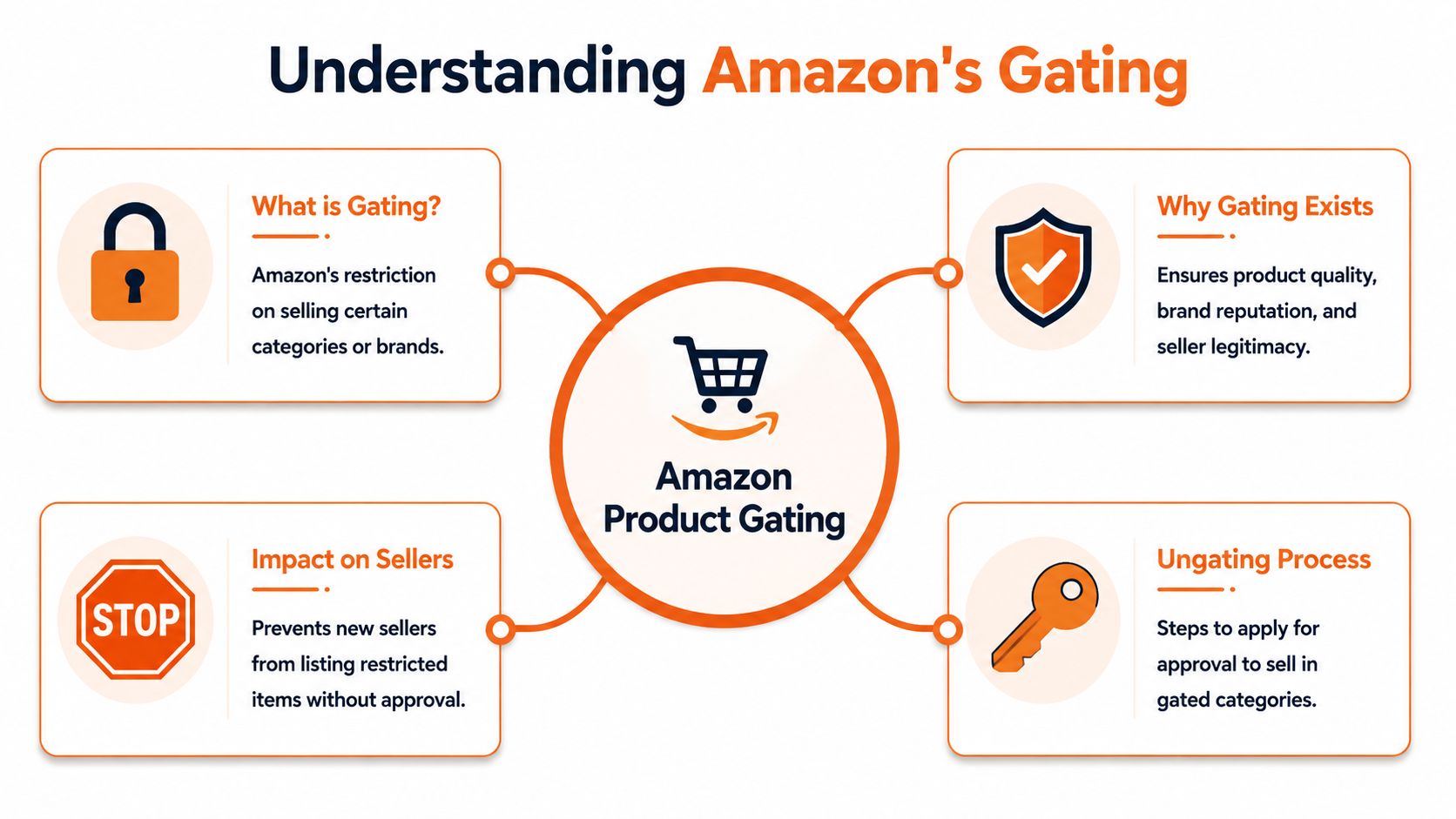
Gating is Amazon's bouncer at the door.
Some categories, brands, and products let you walk in. Others stop you, check your ID, and ask where your inventory came from. If your paperwork looks weak, you're not getting in. If your paperwork looks fake, you're asking for bigger trouble than a denial.
The three restriction types that matter
Most new sellers talk about gating like it's one thing. It isn't. In practice, I think about it in three buckets:
- Auto-approved items that your account can list without extra work
- Request-approval items where Amazon asks for invoices or compliance documents
- Effectively closed items where the usual invoice playbook won't get you far
That distinction matters because Amazon keeps changing the rules. Recent practitioner guidance for 2026 says Amazon shifts what is auto-approved, what needs documentation, and what is effectively impossible to request, and some newer accounts are auto-ungated for certain items from day one. That's why the old “buy units and upload an invoice” advice is incomplete now, as noted in this 2026 ungating breakdown.
Practical rule: Before you buy anything, figure out which restriction type you're actually facing. If you guess wrong, you can spend money solving the wrong problem.
Why Amazon does this
Amazon isn't doing this to annoy you personally. It's trying to cut down on counterfeit risk, customer safety problems, and sketchy sourcing. Categories like Supplements, Grocery, Beauty, and Electronics get more scrutiny because the downside is bigger. One bad seller can create returns, complaints, and legal headaches fast.
For you, that means this is less like flipping a switch and more like applying for a permit.
If you want a simple primer on how sellers talk about the difference between open and restricted areas of the catalog, this guide on unlocking gated and ungated Amazon categories is worth a read.
The mistake beginners make
Beginners ask, “How do I get ungated?”
I think the better question is, “Is this product worth pursuing if I do get ungated?”
Those are not the same question. A gated ASIN can look exciting because fewer sellers can access it. But that doesn't mean you'll win the Buy Box, avoid suppression, or make money. If all you chase is approval, you'll confuse access with opportunity.
Your Ungating Battle Plan and Documentation
Don't start in Seller Central. Start at your desk.
You need a clean package before you click anything. If your invoice is sloppy, your business details don't match, or your supplier is shaky, Amazon will usually shut you down fast. And yes, details matter more than you want them to.

The baseline rules I'd follow every time
Amazon often requires invoices that show a purchase of at least 10 units, dated within the last 90 days, from an authorized supplier. Seller guidance also says strong business documentation can lead to a 70% higher success rate, and keeping your Order Defect Rate below 1% is foundational to approval, according to this ungating requirements guide.
That tells you three things right away:
- Retail receipts are weak ammo. Amazon wants supply-chain proof.
- Fresh paperwork matters. Old invoices die fast.
- Account quality matters. If your account is messy, your docs need to be even stronger.
If your invoice, account details, and supplier trail don't line up cleanly, Amazon has no reason to trust the rest of your submission.
What I'd gather before applying
I like a simple preflight checklist.
- Business match: Your business name and address should match Seller Central exactly.
- Authorized supplier: Buy from a distributor or direct source that can stand behind the invoice.
- Recent invoice: Keep it current and readable.
- Correct quantity: Buy enough to meet the category's practical threshold.
- Category extras: Some categories need more than invoices.
If you sell in Supplements or ingestibles, don't act surprised when Amazon wants more proof. Consequently, founders often need documentation discipline that feels closer to consumer packaged goods than simple reselling. For that mindset, this DTC playbook for verifiable lab data is useful because it shows how serious brands think about product proof, not just listing access.
If you're still figuring out where and how to buy inventory in a way Amazon will respect, this tag on sourcing of products is a solid next read.
Ungating requirements by popular category
| Category | Typical Invoice Requirement | Additional Docs Often Needed |
|---|---|---|
| Beauty | Authorized supplier invoice, recent date, enough units to support approval request | Product photos, sometimes compliance-related documents |
| Supplements | Authorized supplier invoice, recent date, enough units to support approval request | Compliance documents, product photos, supplier verification |
| Grocery | Authorized supplier invoice, recent date, enough units to support approval request | Compliance documents, packaging details, product photos |
| Electronics | Authorized supplier invoice, recent date, enough units to support approval request | Product photos, brand or product-specific documentation |
What people get wrong
A lot of sellers treat ungating like a one-document game. It isn't. Amazon is judging the whole picture. Your account health, your supplier legitimacy, your invoice quality, and your product category all work together.
So don't ask, “Do I have an invoice?” Ask, “Would this file convince a skeptical reviewer that I'm a real operator with real inventory?” That's the standard.
Walking Through the Seller Central Application
Once your paperwork is ready, go into Seller Central and move slowly. Most bad submissions fail because the seller rushes, uploads junk, or sends a file that makes the reviewer do too much work.
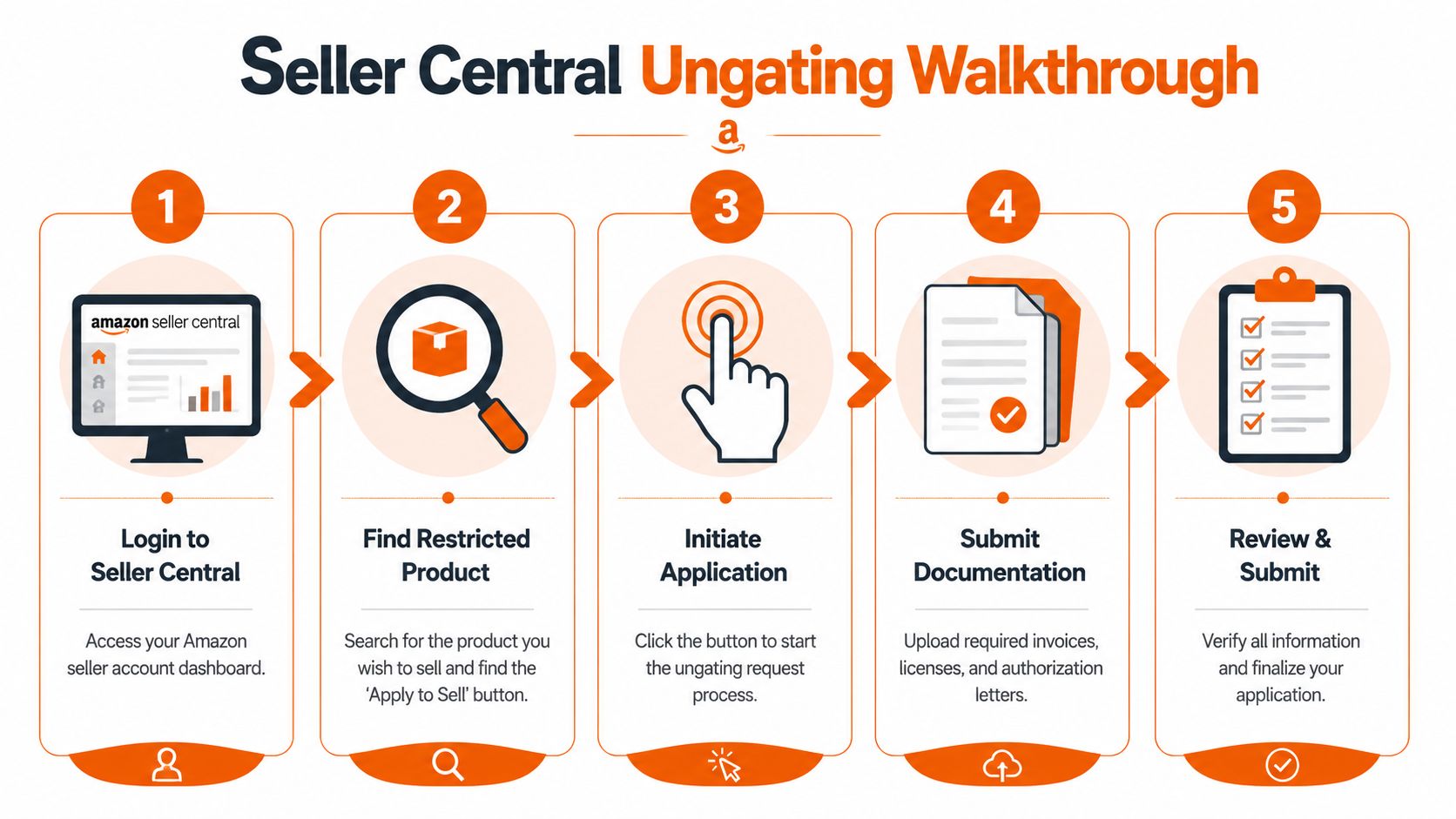
This visual gives you the flow at a glance.
The click path that matters
Usually, you search the product, try to list it, and hit Apply to Sell. Amazon then tells you what it wants for that category, brand, or ASIN. Read that screen carefully. Don't rely on memory from a forum post or an old tutorial.
I'd handle the application like this:
- Find the exact listing you want to sell.
- Open the approval request and read every requirement on that screen.
- Prepare one clean evidence packet instead of scattering uploads.
- Upload readable files with full pages, clear text, and no cut-off corners.
- Double-check names and addresses before you submit.
Build one layered evidence file
One expert walkthrough recommends a layered evidence file with the order confirmation, shipping and delivery emails, the supplier invoice, and product photos. That same walkthrough notes Amazon may verify submissions by contacting your supplier, and some categories require 50 units while others require 10, which is why category checks before purchase matter. You can see that approach in this video walkthrough on Amazon ungating documents.
That's the part many sellers miss. Don't send the minimum. Send a file that tells a coherent story.
I like this order inside a PDF:
- Page 1: Short cover page with your account name and what you're requesting
- Page 2: Order confirmation
- Page 3: Shipping or delivery confirmation
- Page 4: Supplier invoice
- Page 5 onward: Product photos, packaging photos, any extra category docs
The easier you make the reviewer's job, the better your odds.
Here's a useful walkthrough video if you want to see the process in a more visual format.
Don't get cute with documents
Amazon may call or email your supplier. So if you're using fake invoices, borrowed invoices, edited PDFs, or some “service” that feels shady, you're playing with your whole account.
A denial is survivable. A trust problem is harder to unwind.
If your account already has policy friction, read up on Amazon account suspensions before you start poking restricted categories. Ungating mistakes can spill into bigger account risk when the docs look deceptive.
What to expect after you submit
Some approvals happen quickly. Some drag. A common approval window is 1 to 4 weeks, and seller guidance says Amazon looks at account quality metrics like Order Defect Rate below 1%, Late Shipment Rate below 4%, and customer service dissatisfaction below 25%, which you can review in this seller account and ungating overview.
That waiting period is your reminder that ungating is a review process, not a magic button.
Why Your Application Got Rejected and How to Fix It
Rejections feel vague because Amazon rarely writes you a useful explanation.
That doesn't mean the rejection is random. Most denials come from a short list of problems. If you learn to diagnose them, you stop resubmitting the same bad packet over and over.
What the rejection usually means
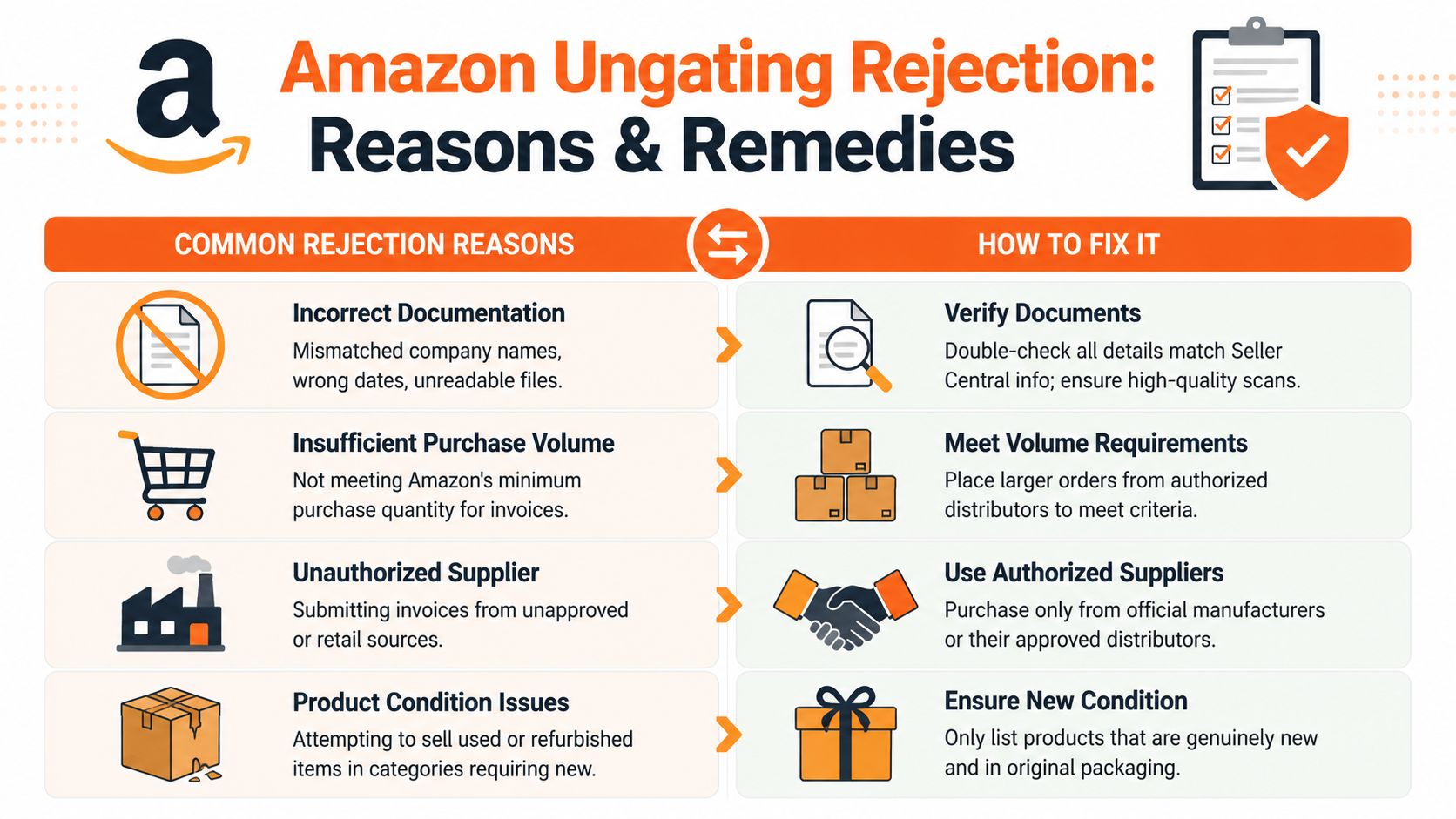
Here's how I read the common failure patterns.
- Invoice looks unverifiable: The supplier may be unknown, the document may look altered, or the contact details may be weak.
- Business details don't match: Your Seller Central name or address doesn't line up with the invoice.
- Quantity looks too low: You didn't meet the practical category threshold.
- Files are unreadable: Bad scans, cropped screenshots, or missing pages kill trust fast.
- Wrong source type: A retail receipt is not the same thing as a wholesale invoice.
Rejection is feedback. Treat it like a broken product sample. Inspect it, fix the flaw, and send a better version.
A simple fix framework
I use a four-part check.
Match
Line up your business name, address, supplier name, item names, and dates. If anything looks inconsistent, fix that first.
Source
Ask whether the supplier would survive scrutiny. If Amazon contacts them, will they confirm the order clearly? If you're not sure, that's your answer.
File quality
Combine documents into one neat PDF. Use clean scans. Keep every page legible. Don't upload random screenshots from your phone if text is fuzzy.
Category logic
Make sure you solved the actual requirement. If that category expects more units or more compliance paperwork, a prettier invoice won't save you.
A short reapplication note that works
Don't write a dramatic appeal. Keep it plain.
Hello Amazon team,
I am resubmitting my application with updated documentation. I have included a readable supplier invoice, matching business details, and supporting order and product documentation for verification. Please review the attached file for approval. Thank you.
That's enough. You're not trying to impress anyone. You're trying to remove doubt.
What not to do after a rejection
Here, sellers dig the hole deeper.
- Don't spam resubmissions: If nothing changed, don't expect a different result.
- Don't edit invoices: Cleaning up readability is one thing. Altering the substance is reckless.
- Don't switch to sketchy workaround services: Shortcuts can create account-level problems.
- Don't keep buying random inventory: Fix the process before you spend again.
If Amazon rejects you, slow down and think like an operator, not a gambler. Most ungating problems are document problems, supplier problems, or judgment problems. All three are fixable if you stop guessing.
Beyond Ungating Smarter Strategies for New Sellers
Here's my blunt take. Too many sellers chase ungating on Amazon because it feels like progress.
Sometimes it is. Sometimes it's just paperwork cosplay.
Amazon's own seller forum makes the big point most guides miss. Being approved for a brand or product does not mean you're allowed to sell it profitably or even at all. Sellers still run into suppressed offers, hard price competition, category policy issues, and brand-owner enforcement, as discussed in this Amazon seller forum thread on what ungating does and doesn't mean.
Stop asking only “Can I get approved”
The better set of questions is:
- Can I restock this product reliably
- Can I make money after fees
- Can I survive if another seller tanks the price
- Can the brand owner shut this down later
- Can I build a repeatable supply chain here
If the answer to those questions is weak, approval doesn't help much.
Better paths for a new seller
I'd rather see a founder build one of these paths than spend months obsessing over a single restricted ASIN.
Build a real wholesale relationship
A real distributor relationship beats one-off invoice hunting. You get cleaner paperwork, steadier replenishment, and fewer surprises when Amazon asks questions.
Create your own brand
Your own brand has different challenges, but you control more of the listing and the supply chain. That's usually a healthier long game than forever begging for access to someone else's shelf.
Choose fulfillment with your economics in mind
A lot of beginners lose money after approval because their margins were fragile from the start. Before you pile inventory into Amazon, learn the tradeoffs in avoiding FBA prep fees and get honest about what prep, handling, and packaging will do to your numbers.
Pick the right operating model
Some products make more sense through FBA. Others fit FBM better, especially if margins are tight or inventory turns are uncertain. This comparison on Amazon FBA vs FBM is worth reading before you commit to a fulfillment path that boxes you in.
Approval is permission. It is not a business model.
My opinion on the best mindset
Treat ungating like underwriting. You are testing whether the product, supplier, and account all hold up under scrutiny.
That mindset changes your behavior. You stop chasing random brands because they look gated and exciting. You start building a cleaner business with better documents, better sourcing, and products you can defend.
That's the difference between a seller who keeps scrambling for the next approval and a founder who builds something durable.
Your Path Forward
If you want to win at ungating on Amazon, be boring in the best way. Keep your account clean. Buy from real suppliers. Keep every document organized. Read the exact approval flow inside Seller Central instead of guessing. And before you spend money, ask whether the product is worth selling after approval.
That's the key filter. Amazon is testing your discipline. You should test the opportunity just as hard.
Get through this process a few times the right way, and you'll build better instincts for every other part of ecommerce too.
If you're building an ecommerce brand in the Midwest and want honest operator feedback without the fake networking energy, check out Chicago Brandstarters. It's a free community for kind, bold, hard-working founders who want real conversations, practical help, and trusted relationships while they build.
Leave a Reply