
Fast replies are often presented as the answer to ecommerce customer service. That advice misses the expensive part. A customer may receive an instant acknowledgment, then wait days for a useful resolution, repeat the same story to several agents, or discover that your return policy changes depending on which channel they use.
Small ecommerce teams need a tighter system. Use automation for predictable questions, give people control over exceptions, and map post-purchase problems before they arrive. The result is a support operation that protects revenue without forcing a founder to sit in the inbox all day.
The Real Cost of Ignoring Ecommerce Customer Service
Many founders treat support as the department that appears after marketing, product, and fulfillment. That order looks sensible until a customer asks a pre-purchase question, abandons checkout because nobody answers, or leaves after a delivery problem. At that point, ecommerce customer service has already affected revenue.
Research cited by Shopify reports that 70% of consumers switch companies when customer service is poor, while 59% say excellent service matters more than price. The same compilation cites PwC research showing that 42% of consumers will pay more for a friendly, welcoming customer experience, while 32% will leave a brand they like after one bad experience.
Those figures change how I'd read a support inbox. It isn't a pile of administrative work sitting beside the business. It contains objections, product questions, delivery anxiety, and signs that your store has created friction somewhere else.
Practical rule: Treat every repeated support question as evidence that a product page, checkout step, policy, or delivery message needs work.
Support can protect margin
Price is easy for shoppers to compare. Confidence is harder to compare, and useful service creates it. A buyer who gets a clear answer about sizing, compatibility, ingredients, shipping, or returns can complete a purchase without opening another tab.
That doesn't mean you should train agents to give discounts whenever a customer complains. A better approach gives them authority to solve defined problems. They can correct an address before dispatch, replace a damaged item, explain a return route, or recover a delayed order with a specific next action.
Shopify's compilation also cites a HubSpot survey where 60% of respondents called quick representative responses the top customer-service factor influencing repeat purchases, while 75% of respondents in Forrester research associated favorite brands with prompt, personalized, and helpful answers. Customer retention tactics work better when service records feed them real objections and reasons for return.
Read support as operating data
Tag every conversation by intent. Start with product question, order status, delivery exception, return, refund, replacement, billing, technical issue, and complaint. Review those tags each week and ask what you can remove from the queue through better information or proactive updates.
You'll also see where automation has limits. A bot might answer “Where is my order?” from a tracking page, but it shouldn't guess when a carrier says delivered and the customer can't find the parcel. That case needs a defined owner, a promised next action, and a record of the outcome.
Support becomes a source of repeat revenue when you connect those observations to merchandising, fulfillment, and lifecycle messaging. You stop paying to acquire shoppers who encounter preventable problems, then lose them because nobody owns the fix.
Picking Channels and Setting Realistic Response Targets
A small ecommerce team should not copy a larger brand's channel list. Email, live chat, phone, social messages, and SMS each create a staffing obligation, and an unanswered channel can reduce trust faster than having fewer options. Choose channels based on customer intent, order volume, and the hours your team can cover. Then publish response targets that still hold during weekends, launches, and delivery disruptions.
A survey of 750 online shoppers found that 94% expected an email reply within 24 hours, 48% wanted one within six hours, and 15% expected one within 60 minutes. Chat had a tighter window: 96% expected a reply within five minutes, 80% wanted one within two minutes, and 49% would leave the site if nobody began typing within one minute. For phone support, 90% of shoppers were willing to wait no more than five minutes, while 60% were willing to wait two minutes or less. The figures come from Aircall's customer service wait-time research.
Use these expectations as planning inputs, not promises you publish automatically. A small team gains more from mapping exceptions and giving each one an owner than from chasing an impressive first-response target it cannot sustain.
Match the channel to the promise
| Channel | Shopper expectation | Staffing strategy |
|---|---|---|
| Same-day reply, with most shoppers expecting an answer within 24 hours | Use a queue, saved replies, and a clear owner for complex cases | |
| Live chat | A first response within five minutes, with many shoppers expecting two minutes or less | Staff it only during visible coverage hours, and show when an agent is available |
| Phone | Short waits; most shoppers hang up after five minutes | Route urgent issues to trained agents, then provide another channel when the queue grows |
Do not leave chat active when nobody can answer it. An empty chat bubble exposes a coverage gap at the moment a shopper is deciding whether to trust your store. Outside staffed hours, replace it with an estimated email response time and a clear route for urgent order problems.
Build priority queues
Put payment failures, suspected fraud, delivery exceptions, and orders tied to a customer deadline ahead of routine product questions. A product question can wait for a considered answer. A failed payment can stop a purchase, while an unmanaged delivery exception can generate repeated contacts.
Set priorities in the helpdesk and reflect them in saved replies. For example:
- Payment failure: confirm the order state, avoid requesting sensitive payment details, and route the case to someone who can check the transaction.
- Delivery exception: review tracking, check the promised delivery window, and state when the next update will arrive.
- Routine product question: use an approved answer that points to the relevant product information.
- Complaint: assign an experienced agent who can make a recovery decision without passing the customer between queues.
A bounded automation rule can classify these intents, collect order details, and suggest the right queue. It should stop when payment risk, missing parcels, damaged goods, or a customer deadline requires judgment. The workflow must create an exception for a person, not hide the case behind another automated message.
Measure the first meaningful reply, not the automated acknowledgment. A useful response answers the immediate question, gives a next step, or states when the team will return with a resolution.
Protect the team from impossible coverage
If evening chat coverage is unavailable, turn chat off outside published hours and direct shoppers to email. If phone support creates an unmanageable queue, offer a callback request or a visible alternative. A smaller promise that the team meets beats a broad promise that leaves customers waiting.
Review backlog age, abandoned chats, reopened conversations, and customer satisfaction each week. Compare those signals with exception volume to see whether faster replies resolved problems or merely shifted them into another queue.
Building Standard Operating Procedures and Escalation Playbooks
Post-purchase issues become expensive when your team handles each one from memory. Late deliveries, missing parcels, damaged goods, wrong items, refunds, exchanges, and stockouts need separate routes. Each route should name one owner and one next action.
A 2025 Narvar State of Post-Purchase Report, based on a survey of 3,461 shoppers, found that 74% of U.S. online shoppers experienced a late delivery during the previous year, while 86% encountered at least one delivery issue. Those problems create the familiar “where is my order” or WISMO conversations, along with refund, exchange, and replacement requests, as described in ecommerce customer service statistics from Macha.
Map the exception before it happens
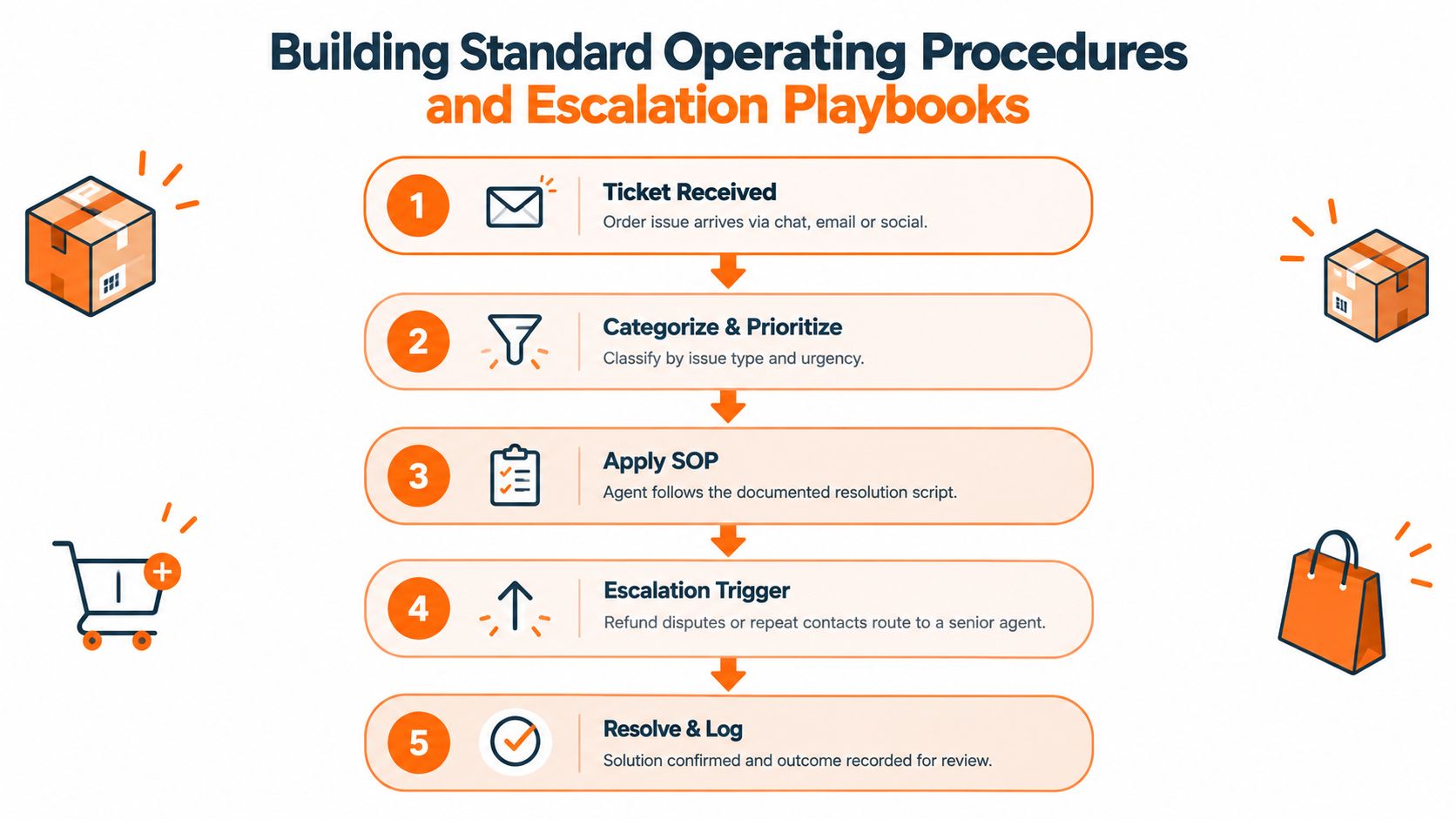
Start with a spreadsheet if your volume is still manageable. Create a row for every common failure and fill in the trigger, owner, customer message, resolution authority, escalation condition, and logging field.
A late shipment might follow this route:
- Check the carrier scan and promised delivery window.
- Tell the customer what the tracking record shows.
- State the next update time, even if the next action is waiting for a carrier scan.
- Escalate when the parcel passes your internal waiting limit or the customer has a deadline.
- Record whether you refunded shipping, replaced the order, or continued tracking.
A missing package marked delivered needs a different route. Ask the customer to check the delivery location and household, then open the carrier process your policy allows. Don't promise a replacement before you know whether inventory, fraud controls, and carrier requirements permit it.
Give returns a decision tree
Write return rules in plain language, then turn them into decisions an agent can follow. The agent should know what happens when the item is unused, opened, damaged, outside the stated window, or unavailable for exchange.
Connect the return workflow to inventory and finance. An exchange request needs an inventory check. A refund needs a payment-status check. A replacement needs a fulfillment owner. If those systems don't connect, assign the next action manually and tell the customer who owns it.
Create saved replies for predictable questions, but leave room for context. A customer asking for a return label after receiving the wrong item shouldn't receive the same message as a customer changing their mind.
For merchants dealing with repeated abuse, chargeback patterns, or coordinated fraud, review a resource on stop checkouts with Securify before taking action. Blocking a customer affects orders and revenue, so define the evidence and approval path before an agent uses it.
Train from real conversations
A useful SOP includes one good example, one edge case, and one reason to escalate. Review the language after a refund dispute or repeat contact. If an agent keeps asking for information the store already has, change the process so the order history appears beside the conversation.
Use guidance on how to create standard operating procedures to document the workflow in a format new agents can follow. Keep each procedure close to the tool where the work happens. A perfect document that nobody opens won't resolve a parcel problem.
Bounding AI Automation Without Losing Customer Trust
The sensible use of AI in a small store is narrower than the sales pitch. Let automation handle order status, routine policy explanations, return initiation, and initial triage. Give a person immediate control when the customer faces loss, confusion, risk, or a policy exception.
Recent evidence shows the trust gap clearly. 78% of U.S. holiday shoppers interacted with AI in 2025, yet 55% had to escalate an AI-handled issue to a human, 45% said AI failed to understand their problem, and only 22% said companies clearly disclosed AI use. 69% believed brands should always receive that disclosure, according to the Liveops 2025 Holiday AI Customer Service Report.
Use a simple escalation matrix
| Customer issue | AI can handle | Human handoff |
|---|---|---|
| Order status | Retrieve authenticated tracking information and explain ordinary scan updates | Tracking says delivered but the parcel is missing, or the customer reports repeated delays |
| Routine returns | Explain the stated policy and begin a standard return | The item is damaged, outside policy, unsafe, or unavailable for exchange |
| Billing | Explain order totals and payment status without exposing sensitive details | Duplicate charges, failed refunds, payment disputes, or suspected fraud |
| Product information | Answer from approved product data | The customer describes an accessibility, safety, medical, or compatibility concern |
| Complaints | Acknowledge the issue and collect context | The customer asks for a remedy, repeats the complaint, or reports a serious service failure |
Give the customer one visible route to a person. Pass the full transcript, order details, and attempted steps to the agent so the customer doesn't start over. When the bot fails, the agent should say what happened, correct the record, and state the next action.
Tell shoppers when they're talking to automation. A plain message works: “You're chatting with our automated assistant. I can help with order status and standard returns. Type ‘agent' at any time for human help.” That language sets a boundary without making the customer hunt for one.
A practical AI agent roadmap can help you plan the handoffs, permissions, and review process before you connect an AI tool to live orders. Start with a limited queue, inspect failed conversations each week, and expand only when the bot gives answers your team would approve.
Guidance on how to build trust with customers applies to automation too. Trust comes from accurate information, visible accountability, and a clean recovery when the system gets something wrong.
Here's a short visual guide to the operating model:
Tracking the Metrics That Actually Drive Retention
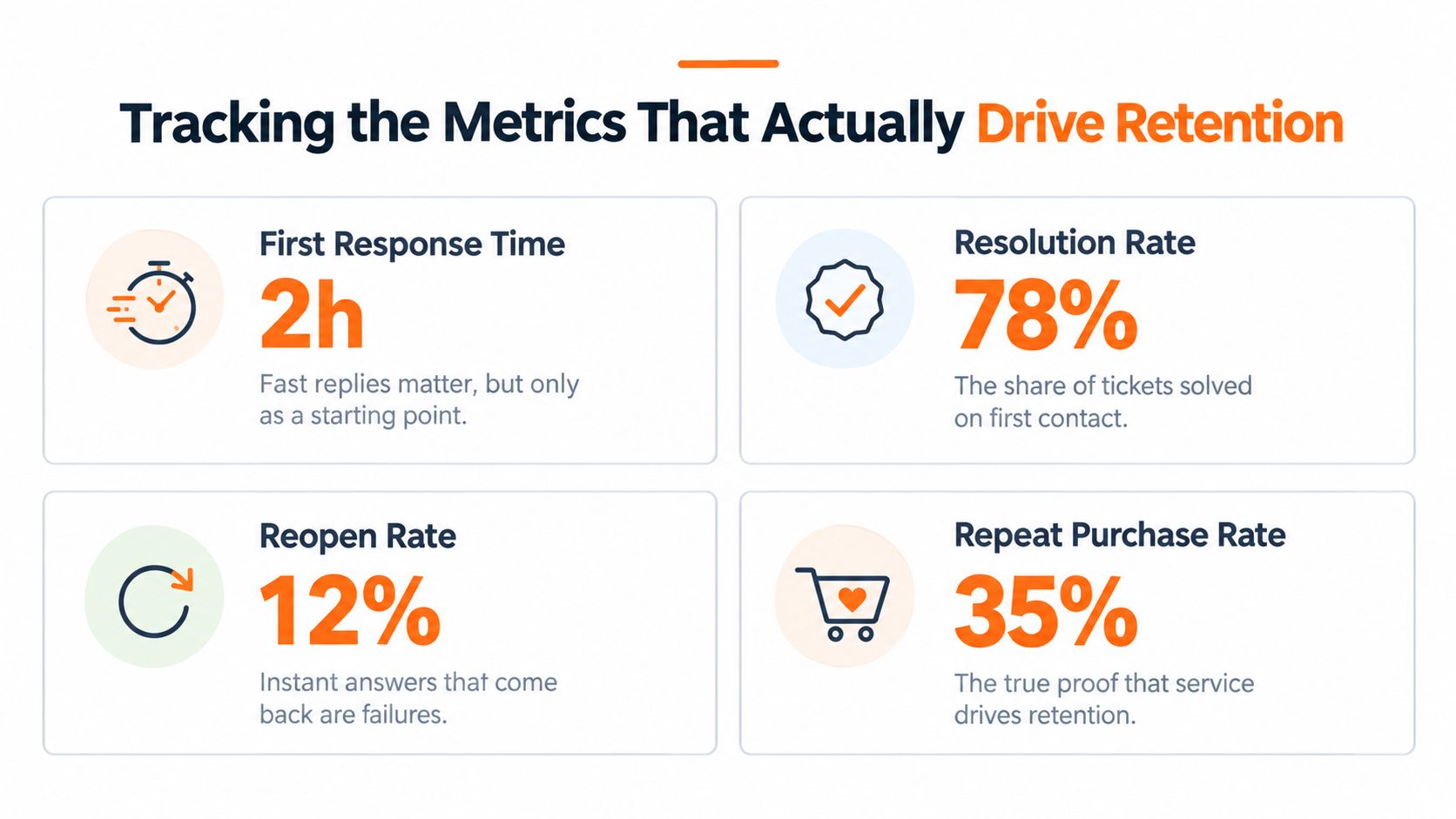
First-response time is easy to display and easy to misuse. An automated acknowledgment can make the dashboard look healthy while the customer still waits for a refund, replacement, or answer. Measure speed, then measure whether the customer got the problem solved.
Run a two-stage FCR program
First, classify tickets by intent. Use order status, billing, returns, technical issues, and complaints as your starting groups. Then measure whether the case closed without a follow-up, transfer, or callback.
Review first-contact resolution beside reopen rate, customer satisfaction, and average handle time. If you reward agents for closing quickly without checking the outcome, they'll learn to end conversations rather than solve them. A chatbot deflection only counts as a resolution when the customer reaches the intended result.
[ SQM Group benchmarking across more than 500 North American contact centers places the cross-industry first-contact-resolution average at about 69%. It describes 70% to 79% as a good operating range, 80% or higher as world-class, and reports that roughly 5% of centers reach that level. Ecommerce benchmarks place FCR at approximately 72% for order-status inquiries, 63% for technical support, and 47% for complaints, according to this first-contact-resolution benchmark. ]
Those figures give you a direction, not a reason to force every queue toward one target. Order status and returns have structured answers. Technical issues and complaints need more judgment, so route them to experienced agents.
Pair speed with durable resolution
Track these measures together:
- First-response time: Count the first meaningful reply and exclude automated acknowledgments.
- Full resolution time: Record when the customer receives the agreed outcome, not when an agent sends the first message.
- Reopen rate: Watch for conversations that return because the first answer missed the problem.
- Repeat contact: Count customers who contact you again about the same order or issue.
- Customer satisfaction: Ask after resolution, then read the written comments rather than relying on the score alone.
A fast first reply can help a customer wait calmly, especially when you give a precise resolution time. It can't compensate for a vague policy or an agent who sends the customer back to the beginning.
Set targets by ticket type
Give order-status tickets a different workflow from complaints. Create an authenticated order lookup, a return decision tree, refund and replacement permissions, and escalation rules for exceptions. Then review performance by channel, issue type, business hours, and time zone.
Use median performance and inspect the slow tail. A few unusually old cases can reveal a missing permission, an inventory problem, or an owner who never received the handoff. The dashboard should help you repair the process, not merely rank agents.
Scaling Your Support Operations as Your Brand Grows
At first, the founder answers every difficult message. That gives you useful product knowledge, but it also creates a bottleneck. Customers wait for the person with enough authority to make a decision, while routine questions consume the same attention.
Move routine work into saved replies, authenticated order lookup, and bounded AI before you hire. Keep exception decisions with a founder or senior agent until you can write the rule clearly. If you can't explain when an agent may refund, replace, exchange, or escalate, another hire will multiply confusion.
Hire for judgment
Look for people who can read the full conversation, write plainly, and admit when they need help. Train them against your exception map. Give them a sample late-delivery case, a damaged-item case, a refund dispute, and a complaint that needs escalation.
Review their first conversations for accuracy and tone. Speed comes later. A fast agent who makes promises your fulfillment team can't keep creates more work for everyone.
Add tools in the right order
Start with a shared inbox, order data, saved replies, tags, and a searchable SOP. Add AI when you know which conversations are repetitive and what a correct answer looks like. Upgrade to more advanced helpdesk tooling when your team loses context across channels or spends too much time copying order information between systems.
Peer discussion can shorten this learning curve. Chicago Brandstarters is a free founder community where ecommerce operators discuss customer-service processes, saved replies, reviews, and difficult customer problems with other builders. That kind of candid exchange can help you test a workflow before you spend on enterprise software.
Chicago Brandstarters offers a free, vetted community for founders building brands from idea stage toward seven figures, with private small-group dinners and a founder group chat for practical operator conversations. Visit Chicago Brandstarters to meet peers who can help you pressure-test your support workflows, escalation rules, and next hiring decision.
Leave a Reply