
You get your first few Amazon orders, feel pretty good, then open the payout report and think, wait, where did the money go?
I've seen that look before. I've had that look before. New founders usually assume the pain came from shipping or ads. A lot of the time, the first punch to the gut is simpler than that. Amazon took its cut, exactly like it said it would.
That cut is the referral fee. If you sell on Amazon, you need to stop treating it like a surprise and start treating it like part of your cost of goods. Same mental bucket as packaging, freight, and defects. You don't have to like it. You do have to price around it.
Your First Amazon Payout Is a Reality Check
The first payout shock is almost a rite of passage.
You launch a product. Orders come in. Your Seller Central dashboard starts to look alive. Then the deposit lands and it feels skinny. You expected one number and got another. That gap is where a lot of sloppy Amazon businesses die early.

Amazon Is Charging You Rent
I think about Amazon like the biggest mall in town. You didn't build the foot traffic. You didn't build the checkout system. You didn't build the trust. Amazon did, and it charges rent for shelf space.
That rent on each sale is the referral fee.
If you don't frame it that way, you'll keep making emotional pricing decisions. You'll drop your price because competitors scare you. You'll spend on ads to chase velocity. Then you'll wonder why sales are moving but cash isn't piling up.
You can survive high fees. You can't survive not knowing your fee stack before you launch.
Treat It Like COGS, Not Drama
A common misstep for new founders is calling fees “platform costs” and keeping them mentally separate from the product. Bad move. If a fee hits every sale, it belongs in your unit economics.
That means you should model it before you order inventory, not after your first payout ruins your mood. If you want a practical breakdown of how to think about unit economics, this guide on mastering Amazon selling fees and COGS is a solid companion to your own spreadsheet.
A simple mindset shift helps:
- Stop calling it missing money: Amazon didn't lose your money. It charged for access.
- Build your price from the bottom up: Start with landed cost, referral fee, fulfillment, and ad tolerance.
- Decide fast if the product works: If the math is ugly, fix the product or kill it.
Most founders don't need more motivation. They need cleaner math and less wishful thinking.
What Exactly Is an Amazon Referral Fee
Your customer pays Amazon at checkout. Amazon takes its cut first. What lands in your account is the sale price minus the referral fee and the rest of your fee stack.
That referral fee is Amazon's commission for bringing the buyer, processing the order through its marketplace, and letting you sell inside its system. Treat it like part of your product cost, because it hits every sale. If you want a broader breakdown of the cost of selling on Amazon, start there and build your numbers from the bottom up.
It Works Like a Sales Commission
A lot of new founders label referral fees as random platform overhead. That mistake wrecks pricing.
Referral fees are tied to the sale itself. You make a sale, Amazon takes a percentage based on the product category, and you keep the remainder. That is the job the fee does. It is not a subscription charge, and it is not something you can price around after the fact.
Amazon also applies a minimum referral amount in some cases, so low-priced products can get squeezed faster than expected. That is one reason cheap items often look better in a sourcing spreadsheet than they do in real payouts.
What The Fee Is Actually Based On
Beginners usually assume Amazon only takes a cut of the item price. That is how margin leaks.
The referral fee is based on the total sales price Amazon uses for the transaction, and the percentage depends on the category your product is assigned to. If the category is wrong, your economics are wrong. If your price is too low, the fee bites harder.
Here's the simple version I give founders:
- The fee is charged per sale. It belongs in your unit economics.
- The category decides the rate. Similar products can carry different percentages.
- Bad category setup costs real money. You can lose margin without noticing until payouts hit.
If you came looking for one universal Amazon referral fee, there isn't one. Amazon assigns the product to a category, applies that category's commission, and collects it every time you sell.
That's why I want you thinking like an operator, not a listing jockey. Before you order inventory, know what the channel takes, know what margin is left, and decide whether the product deserves a launch. For another practical angle on margin planning, read this expert guide to Amazon profitability for brands.
How Much You Will Pay in Referral Fees
You launch a product at a price that feels healthy, then your first payout lands and the math gets ugly fast. That is usually when founders realize Amazon's referral fee is not background noise. It is a real per-unit cost that can wreck a decent-looking margin.
For a lot of physical products, you will land somewhere in the middle of Amazon's fee table. Some categories sit lower. Some get painful fast. The point is not to memorize every category. The point is to know your likely rate before you order inventory, because a bad assumption here poisons the whole model.
Here's the practical benchmark view.
| Product Category | Referral Fee Percentage | Minimum Fee |
|---|---|---|
| Most major categories | 15% | Amazon charges the percentage fee or a minimum amount, whichever is greater |
| Some lower-fee categories | 8% | Amazon charges the percentage fee or a minimum amount, whichever is greater |
| Amazon Device Accessories | 45% | Amazon charges the percentage fee or a minimum amount, whichever is greater |
That spread is the lesson.
A product that survives at 8% can get strangled at 15%. A product that looks promising at 15% can become a complete waste of time in a high-fee category. I have seen founders obsess over packaging costs while ignoring the fee rate that hits every single sale. That is backwards.
The Fee Range Founders Should Build Around
If you are new, start with a simple rule. Treat the referral fee like part of cost of goods sold, not like a random marketplace tax you deal with later.
That changes how you make decisions:
- Validate the category before you buy stock. Close enough is not good enough.
- Build margin around the likely fee rate. If the product only works in your sheet with a lower rate, the product does not work.
- Watch high-fee categories carefully. One wrong assumption can wipe out your contribution margin.
I also recommend reading this expert guide to Amazon profitability for brands after you run your own numbers. It is a useful reality check if you are still treating Amazon fees as an afterthought.
Why Referral Fees Deserve More Respect
Freight feels dramatic because you can see the cartons and invoices. Referral fees are quieter. They still hit every order. They rise with your selling price. And they show up whether or not your ads are efficient, your returns are under control, or your product has enough margin to deserve shelf space on Amazon.
This is why I push founders to manage fees, not just accept them.
Use your pricing sheet and line the referral fee up against product cost, freight, FBA, and ad spend. Then ask one blunt question: does this SKU still deserve to exist after Amazon takes its cut? If the answer is shaky, fix the economics before launch. You will save yourself months of fake revenue and real pain.
You should also spend time with resources on the broader cost of selling on Amazon so you do not isolate one fee and miss the full stack.
Calculating Your True Referral Fee Cost
Most founders don't get crushed by the percentage. They get crushed by bad math.
The referral fee percentage is only part of the story. You need to calculate it on the right base and separate it from the other charges that hit the same order.
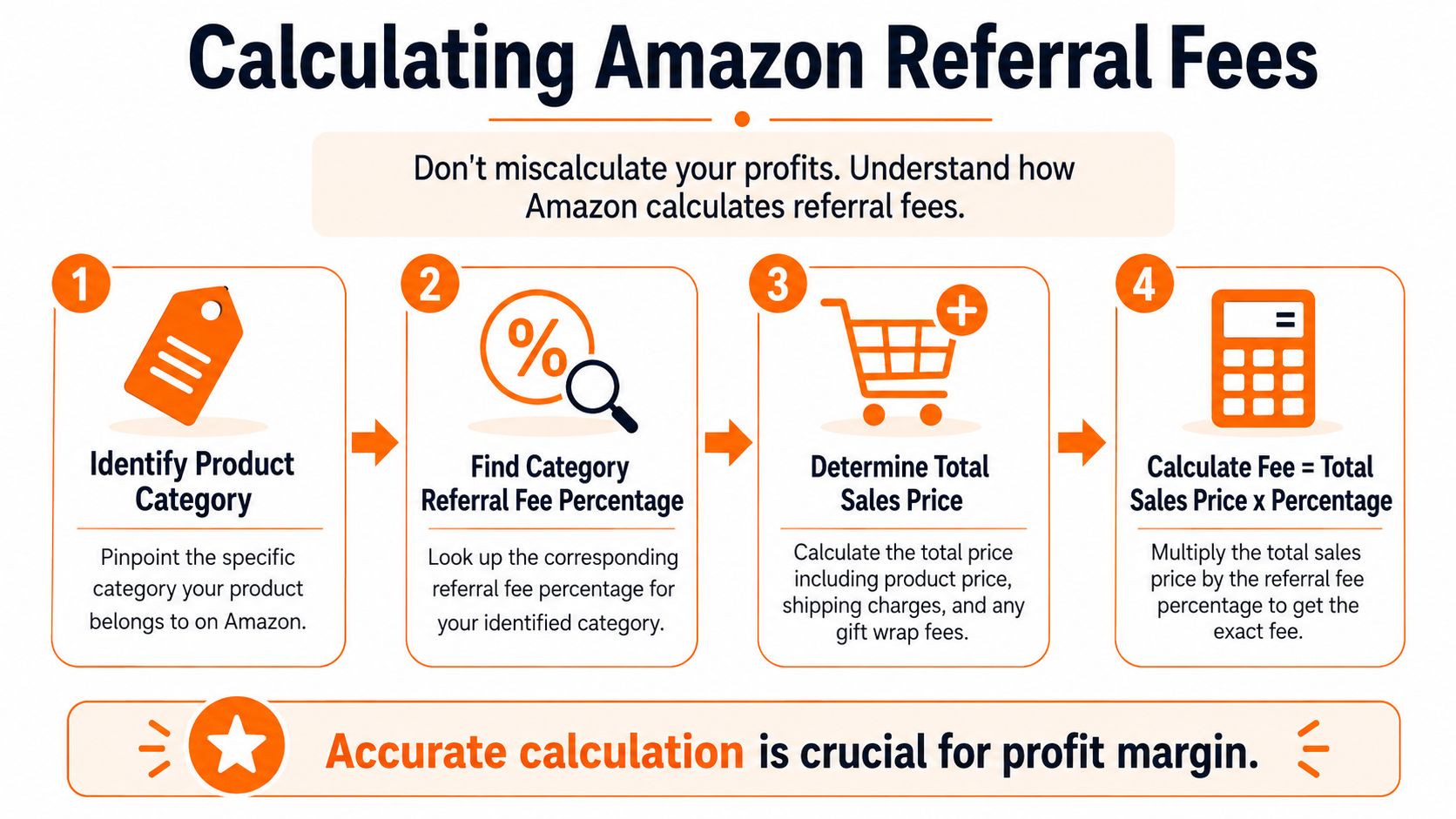
Start with the process.
Use The Total Sales Price
If you're in a 15% category and you sell a $25 product, the referral fee is $3.75 before fulfillment, advertising, and storage costs, as shown in SellerLegend's example. That part is simple.
The mistake happens when sellers forget that Amazon calculates referral fees on the total sales price. So if your offer includes extra charges paid by the customer, your fee base can rise with it. That's why I always tell founders to model the entire customer-paid amount, not just the item price.
Here's the practical workflow:
- Find your category
- Confirm the referral percentage
- Identify the total sales price
- Apply the percentage
- Then stack the rest of your costs beside it
This video is a useful visual walk-through if you want to see the logic in motion.
Keep Referral Fees Separate From Everything Else
Referral fee math gets muddy when founders lump every Amazon charge into one blob. Don't do that. Keep each fee in its own row.
For media products, Amazon adds a $1.80 closing fee on top of the referral fee. Also, the referral fee percentage does not change by selling plan, but Individual sellers pay an extra $0.99 per item sold while Professional sellers pay a monthly subscription instead, as explained in this Feedvisor breakdown of Amazon referral fees.
That means your spreadsheet should separate:
- Referral fee: The category-based commission
- Media closing fee: Only if you sell media products
- Per item plan charge: If you're on the Individual plan
- Fulfillment and storage: Separate operational costs
A clean P&L beats a clever one. If you can't point to each fee line by line, you're guessing.
If you use FBA, keep shipping and inbound planning in the same conversation, because bad inbound costs can make a decent product look broken. This guide on shipping to Amazon FBA helps tie that part together.
Avoid The Category Assignment Money Pit
This is one of the dumbest ways to lose money on Amazon, and it happens all the time.
You list a product. Amazon assigns a category. You assume it's fine. Months later you realize the fee treatment isn't what you expected. By then, you've already paid the wrong economics over and over.
That's why I call category assignment a money pit. It's quiet, boring, and expensive.
Similar Products Can Get Very Different Treatment
One product can sit in a lower-fee area while a close cousin gets pushed into a more expensive bucket. If you don't check, you won't notice until margin keeps coming in thinner than expected.
I've seen founders spend hours negotiating with manufacturers to save a little on packaging while ignoring category classification entirely. That's backwards. If Amazon classifies you poorly, the fee leak hits every single unit.
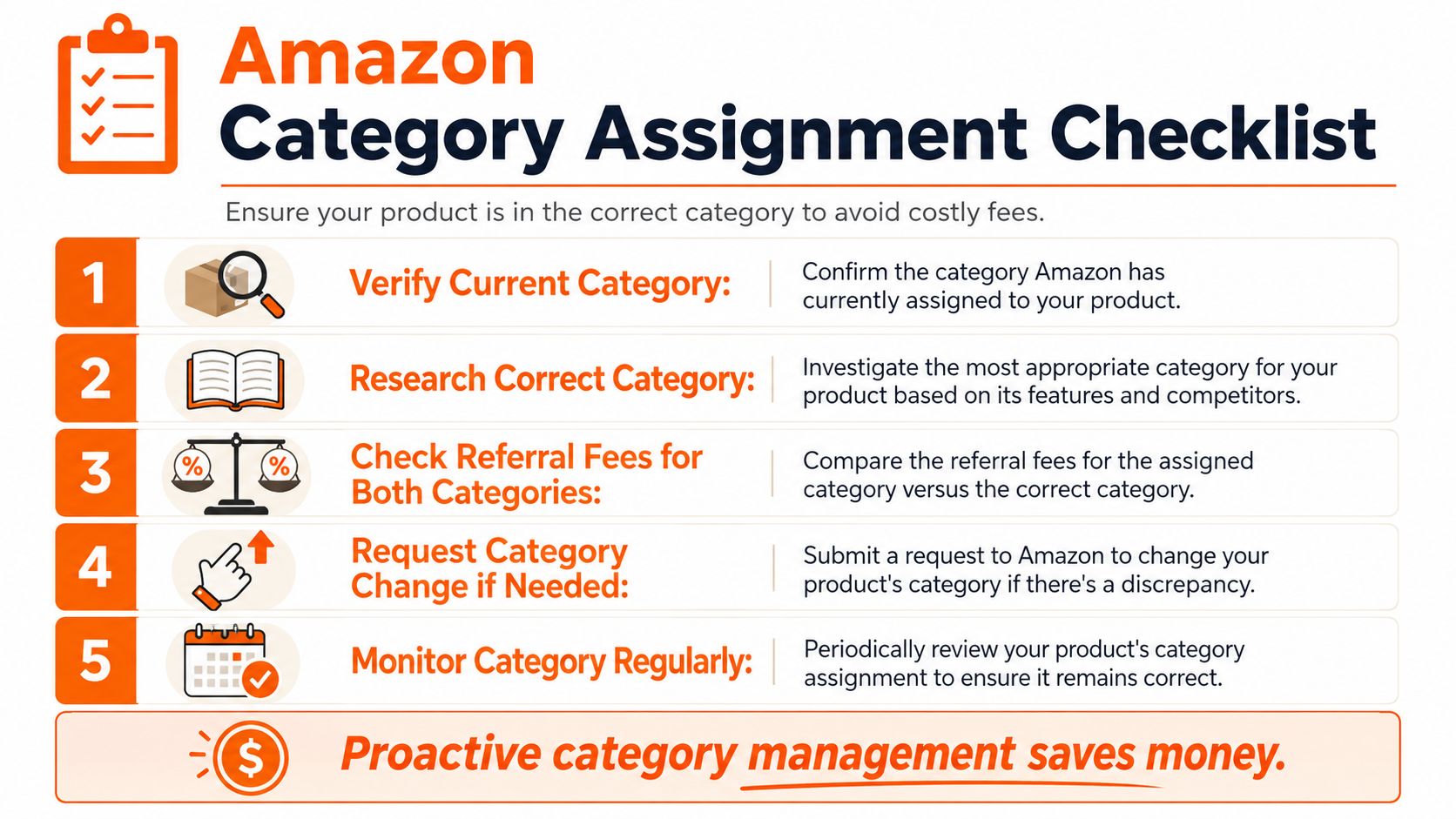
Your Audit Checklist
Do this like an operator, not like a hopeful beginner.
- Check your fee preview: Look at what Amazon charges on the listing.
- Compare against close competitors: Don't copy their assumptions, but do inspect how similar products are placed.
- Read your listing language: Product title, attributes, and backend details can influence how Amazon interprets the item.
- Open a case if the category looks wrong: Be specific. Explain the product clearly and ask for review.
- Recheck after changes: Don't assume a fix sticks forever.
If your margin feels tighter than your spreadsheet said it should, category assignment is one of the first places I'd investigate.
The bigger point is simple. Founders often treat Amazon like a vending machine. Upload, wait, collect. That's not how this works. You have to manage the listing as if each field can change your economics, because sometimes it can.
How to Actively Manage Your Referral Fee Costs
You can't remove Amazon referral fees. You can stop letting them boss you around.
That's the founder mindset I want you to keep. Referral fees are a design constraint. Same as packaging limits, MOQ pressure, and freight. Good operators work with constraints. They don't whine about them.
Build The Product With Fees In Mind
A lot of people choose a product first and think about Amazon economics later. I think that's upside down.
Before you commit to a product, ask a few blunt questions:
- Can I explain this item clearly enough that it lands in the right category
- Does this product have enough gross margin to survive Amazon's cut
- Would a small design tweak make the economics cleaner
Sometimes the best move is changing the product presentation, bundle structure, or offer format before launch. That's not gaming the system. That's doing your homework.
Price Like An Adult
Since referral fees scale with the sale, sloppy pricing gets expensive fast. You need to know how much room you have, not how much room you wish you had.
I like to model three pricing states: one where the product feels safe, one where it feels aggressive, and one where it feels risky. Then I look at whether the product still deserves to exist once all the Amazon costs are in.
If you want help thinking through pricing logic, this piece on optimizing Amazon pricing for profit is useful as a second opinion.
You should also compare your fulfillment method because the referral fee is only one part of the margin puzzle. This breakdown of Amazon FBA vs FBM helps you think through the tradeoffs.
Use A Few Levers, Not Wishful Thinking
Here are the levers I'd pull:
- Tighten the offer: If the product is weak, no fee strategy saves it.
- Test bundles carefully: Bundling can improve margin logic if the main item and offer structure make sense.
- Protect price discipline: Don't chase every competitor downward.
- Review fee impact before every major change: New packaging, new bundle, new variation. Re-run the math.
The people who get crushed by referral fees Amazon charges are usually passive. They accept the category, accept the pricing pressure, accept weak margins, then try to “make it up on volume.” That line has buried a lot of small brands.
You don't need to outsmart Amazon. You need to respect the math early and manage it often.
If you're building an ecommerce brand and want honest conversations with operators who've already stepped on the rakes, Chicago Brandstarters is worth a look. It's a free community for kind, hard-working founders in Chicago and the Midwest who want real tactics, real friendships, and less fake networking.
Leave a Reply