
You're driving traffic to your Shopify store, but are those visitors actually turning into customers? Getting people in the door is just the start. The real challenge, and where I see most founders stumble, is closing the gap between a visitor and a buyer. This is exactly what conversion rate optimization is all about.
Setting Your Baseline for Shopify Conversions
Before you start changing anything, you must know your numbers. Trying to boost sales without a baseline is like driving with your eyes shut—you have no idea where you are or where you're going.
First, let's get your dashboard set up. I'll show you how to use tools you already have, like Google Analytics 4 and Shopify’s reports, to see where you stand. This isn't just about one number; it’s about understanding the story your data is telling you.
Defining Your Conversion Goals
For your Shopify store, a sale is the main goal. Obvious, right? But if you only focus on the final sale, you miss the rest of the story. A solid e-commerce growth strategy tracks the small wins—the micro-conversions—that lead to the big one.
I always tell founders to track these actions to get the full picture:
- Adding an item to the cart: This shows me clear purchase intent. They want it, even if they don't buy it right now.
- Reaching the checkout page: A huge step. I need to know how many people get here versus how many finish. It's critical.
- Signing up for your email list: This gives you a direct line to a potential customer. It's a massive asset for me.
- Viewing a key product page: This tells me which products are grabbing attention and are worth optimizing first.
Think of it like this: a sale is the touchdown, but your micro-conversions are the first downs that move you down the field. I track them to see what's working and, more importantly, where I'm getting stuck.
Understanding Your Starting Point
So, what's a "good" conversion rate? Honestly, it varies wildly. This table shows just how big the gap is between an average store and the top performers.
Shopify Conversion Rate Benchmarks
| Performance Tier | Average Conversion Rate | Customers per 10,000 Visitors |
|---|---|---|
| Average Store | 1.4% | 140 |
| Top 20% Store | 3.2% | 320 |
| Top 10% Store | 4.7% | 470 |
Let these numbers sink in for a minute. For a store I run with 10,000 visitors a month, moving from an average 1.4% to a top-tier 4.7% means going from 140 customers to 470. That’s more than triple the business from the exact same traffic.
This isn't about feeling bad if your numbers are low. It's about seeing the huge opportunity right in front of you. Once you have your baseline, every tenth of a percent you improve is pure profit hitting your bottom line.
Auditing Your Store to Find Conversion Leaks
Alright, now that your data is flowing, it’s time for me to play detective.
A conversion audit is about finding the "leaks"—the friction points that make people leave your store without buying. Think of your site as a bucket. I'm looking for the holes where your sales are dripping away.
Your mission is to walk through your own site, not as the owner, but as a new visitor. Where does it feel slow? Confusing? Untrustworthy? I’m not guessing here; I'm hunting for the exact moments a potential customer says, "Forget it," and clicks away.
Starting Your Hands-On Audit
The best way to kick this off is to experience your store like a real customer. I mean it. Open an incognito browser window and go through the entire buying journey, from homepage to checkout. This fresh perspective is crucial for you to spot problems you’ve gone blind to.
As you go, keep your eyes peeled for issues in these four areas. This is where I see most Shopify stores bleed conversions:
- Site Speed: Does your homepage pop up instantly? What about product pages? A one-second delay feels like an eternity to a modern shopper.
- Product Page Clarity: Can you understand what you’re selling in five seconds? Are your descriptions compelling? Are the images crisp and clear?
- Checkout Flow: How many clicks does it take to buy something? Are you forcing people to create an account? Every extra step is another chance for them to bail.
- Trust Signals: Does your site feel legit? Do you have reviews? A clear return policy? Professional branding that doesn't look like it was made in an afternoon?
An audit isn't about beating yourself up. It’s about finding opportunities to make your customers' lives easier. Every piece of friction you remove makes it simpler for them to give you their money. You're just clearing the path.
Using Tools to See What You Can’t
Your personal walkthrough is a fantastic start, but you can’t see everything. To find the invisible leaks, I bring in tools to confirm my hunches with cold, hard data.
I recommend starting with two types of free tools to get the full picture:
- Performance Analysis: Run your store through Google PageSpeed Insights. It’s a no-brainer. The tool will show you exactly what's dragging your site down. Remember, over 40% of shoppers will abandon a site that takes more than three seconds to load.
- User Behavior Recording: Get a tool like Hotjar or Microsoft Clarity. These are game-changers. They let you watch actual user sessions, so you can see where people get stuck, rage-click, or abandon their carts. It’s like watching over your customer’s shoulder.
By combining what you found in your walkthrough with the data from these tools, you’ll build a prioritized "leak list." This becomes your roadmap for boosting conversions. If you want more guidance on structuring a project like this, you can learn more about creating a solid web site project plan.
Prioritizing Fixes for Maximum Impact
Okay, your audit probably spat out a massive to-do list. I get it. Looking at that list can feel overwhelming. Don't panic.
The real secret to conversion rate optimization for Shopify isn't fixing everything at once. It’s fixing the right things first.
Trying to tackle it all is like trying to plug a dozen leaks in a boat with only two hands. You'll just sink. I use a simple but powerful method to focus my energy where it matters.
Introducing the ICE Framework
The ICE framework is a decision-making tool I use to score every potential fix on my list. It’s an acronym for Impact, Confidence, and Ease.
When you look at an item on your audit list, you just ask three questions:
- Impact: How big of a positive impact will this actually have on my conversion rate?
- Confidence: How sure am I that this is a real problem and my fix will work?
- Ease: How hard is this to implement? Think time, money, and technical headaches.
You give each a gut-check score from 1-10. The tasks with the highest total scores are the ones you jump on first. This isn't about getting lost in spreadsheets; it's a quick way to force yourself to be honest about your priorities. You might find my guide on developing a framework for making decisions useful for applying this kind of structured thinking to other parts of your business.
This simple exercise immediately separates your quick wins from the stuff that will eat your time for an uncertain payoff.
Start with the Biggest Conversion Killer: Speed
Every time I use the ICE model, one issue almost always flies to the top of the list for Shopify stores: page speed. It’s a 10 on Impact, a 10 on Confidence (I know slow sites kill sales), and the Ease score is often surprisingly high.
Slow-loading pages are the number one enemy of conversions. Honestly, page speed is one of the highest-ROI investments you can make.
Google’s own data shows a one-second improvement in mobile load time can boost conversions by up to 27%. Let's make that real. If your store is converting at 1.4%, just getting your load time under two seconds could realistically lift that rate toward 1.8% or even 2.1%. You can dig into the data behind these impactful conversion optimization findings yourself.
This isn’t a small tweak. It's a fundamental improvement that affects every single visitor. A fast site feels professional and trustworthy; a slow one feels broken and amateur.
Quick Fixes for Immediate Speed Gains
You don't need to be a developer to see a real difference this week. Here are my go-to moves for an instant speed boost:
Compress Your Images: Large, heavy images are the most common reason for a slow Shopify store. It's a classic rookie mistake. I use a tool like ImageOptim or a Shopify app like TinyIMG to automatically crush the file size of my product and theme images. This one move can literally cut load times in half.
Audit Your Apps: Be ruthless. Every app you install can add code that drags your store down. I go through my app list and ask: "Am I really using this? Is it making me money?" If the answer is no, I uninstall it.
Enable Lazy Loading: This is a clever trick that only loads images when a visitor scrolls to them, instead of loading every image at once. Most modern Shopify themes have this built-in. Check your theme settings and make sure it’s on.
Crafting Product Pages and Checkouts That Convert

Let’s get real. Your product page is your digital salesperson. Imagine walking into a store where the employee just reads a spec sheet at you. You’d be out of there in a second. That's what happens if your product page is just a list of features.
After you’ve put out the big fires like site speed, it’s time to get granular. I’m talking about the two places where the magic happens: the product page and the checkout. This is where you turn a browser into a buyer, and small tweaks here make a massive difference in your conversion rate optimization for Shopify.
Turning Product Pages into Powerful Sales Tools
I see so many Shopify stores treat their product pages like an inventory list. This is a huge mistake. You need a total mindset shift. Your page isn't just showing what you sell; it's selling why someone absolutely needs it.
Always think benefits over features. A feature is what your product is ("100% organic cotton"). A benefit is what the customer gets ("so soft it won't irritate your baby's sensitive skin"). It’s my job to connect those dots for you.
Here’s my playbook for a killer product page:
- Lead with Lifestyle Shots: Show your product being used and enjoyed. The clean, white-background shot is essential, but it’s the lifestyle photo that tells a story. It lets a customer see themselves using your product.
- Write Benefit-Driven Copy: Hook them immediately by addressing a pain point or a desire. Then, use short sentences and bullet points to hammer home the top 3-5 benefits.
- Put Social Proof Front and Center: Don’t bury your reviews! I’ve seen stores boost conversions just by moving the star rating right under the product title. It’s an instant hit of trust.
Your product page has one job: build enough desire and trust to earn that "Add to Cart" click. Every single thing on that page—every word, every image—needs to work towards that one goal.
Smoothing Out the Final Step: Your Checkout
You did it. You got them to the checkout. Don't fumble the ball now! My goal here is simple: make it as easy as possible for them to give you their money.
Shopify’s checkout is already one of the best, but you can still mess it up. A reported 18% of shoppers ditch their cart if the checkout is too clunky. Your only job is to get out of their way.
Here are the most effective ways I streamline a Shopify checkout:
- Offer Express Checkouts: Turn on Shop Pay, Apple Pay, and Google Pay. This is a no-brainer. These let your customers check out in seconds.
- Kill Unnecessary Fields: Do you really need their phone number? Or a "Company" field? Every extra box is another reason for them to hesitate. I strip it down to the absolute essentials.
- Show Off Trust Badges: Display the logos for Visa, Mastercard, and PayPal. Add a security badge like "SSL Secure Connection." These little logos are huge visual cues that tell new customers it's safe to buy from you.
By dialing in these two pages, you're not just selling products. You're creating a smooth, persuasive journey that guides a customer right to a purchase they'll feel great about.
Going on Offense: A/B Testing for Growth
Alright, you've plugged the biggest holes. Your site is fast, your product pages are persuasive, and your checkout is smooth. Now it's time to go from playing defense to playing offense.
This is where the real fun starts. I’m moving you beyond fixing the obvious stuff and into the world of smart, data-driven growth. Welcome to A/B testing.
Think of it this way: A/B testing is like asking thousands of your customers which version of your page they like more. The beautiful part is, they vote with their wallets. You don't have to guess what works—you let your actual customers tell you.
Start with a Strong Hypothesis
You can't just throw spaghetti at the wall. Every good test I've ever run started with a solid, educated guess. I call it a hypothesis.
Don't let the word scare you. It's just a simple framework: "If I change [this one thing], then [this metric] will improve, because [this is what I believe about my customers]."
Here's what that looks like in the real world:
- Hypothesis: "If I change the button text on our product pages from 'Add to Cart' to 'Add to My Bag,' then we'll see more cart additions, because our fashion-conscious shoppers will find 'My Bag' more personal and less transactional."
See? It's not rocket science. This structure forces you to be clear about what you're changing and, more importantly, why you think it’ll work. It turns a random idea into a structured experiment.
A good hypothesis is a recipe. You have your ingredients (the change), your desired dish (the conversion lift), and the reason it tastes good (the customer psychology). You're not just guessing; you're testing a specific belief.
Your First A/B Test Checklist
You don't need a PhD to get your first test off the ground. You just need a solid game plan. Here’s a simple checklist I use to go from idea to result.
Test One. Thing. At. A. Time. This is non-negotiable. If you change the headline and the button color, you'll have no idea which one moved the needle. One variable per test. Period.
Pick the Right Battlefield. Don't bother testing a page with 10 visitors a month. You need traffic. I pick a page that already gets decent eyeballs, like a homepage or a best-selling product page. More traffic means you get reliable results faster.
Use a Shopify Testing App. Seriously, don't try to code this yourself. There are fantastic apps that make this a breeze. I use tools like Intelligems, VWO, or the Google Optimize integration to handle all the heavy lifting—splitting traffic, tracking clicks, and counting the money.
Let It Cook. This is where I see people mess up. They call a test after two days. Big mistake. You need to let a test run for at least two full weeks. This gets you through a complete buying cycle and helps you reach statistical significance (you're looking for a 95% confidence level). It’s the only way you'll know your result isn't a random fluke.
Once the test is over, you'll have a clear winner. It doesn't even matter if your hypothesis was wrong. Either way, you just learned something valuable about your customers.
Now you take that lesson, form your next hypothesis, and you do it all over again. This is how you build a real system for growth.
The CRO Toolkit and Your Quarterly Rhythm
Alright, let's talk about the gear and the game plan.
You don’t need to spend a fortune on conversion rate optimization for Shopify. It's not about the flashiest software; it’s about picking a few solid tools that get the job done.
I’m going to share the apps and resources I personally rely on. Think of this as your starting toolkit. It’s what you’ll use as you build your optimization rhythm.
My Go-To Shopify Apps and Tools
You don't need a dozen apps to start. I just need you to plug your biggest leaks first. Start with these.
Behavior Analytics (The "Why"): You absolutely need to install Hotjar or Microsoft Clarity. I consider these non-negotiable. They let you watch what real people do on your site and see where they click. This is how you figure out why people are leaving. It's like a one-way mirror into their screen.
A/B Testing (The "What If"): Once you have ideas, you need to test them. I'm a big fan of Intelligems and VWO for this. These tools make it easy to test a new headline, a different button color, or a whole new page layout to see what actually gets more people to buy.
Social Proof (The Trust Builders): Apps like Loox or Yotpo are my top picks for pulling in customer reviews and photos. There's almost nothing more powerful than a new customer seeing photos of real people happily using your products. You must have this for building trust.
This is the basic flow for any A/B test you're going to run. It's simple, but you have to follow the process.
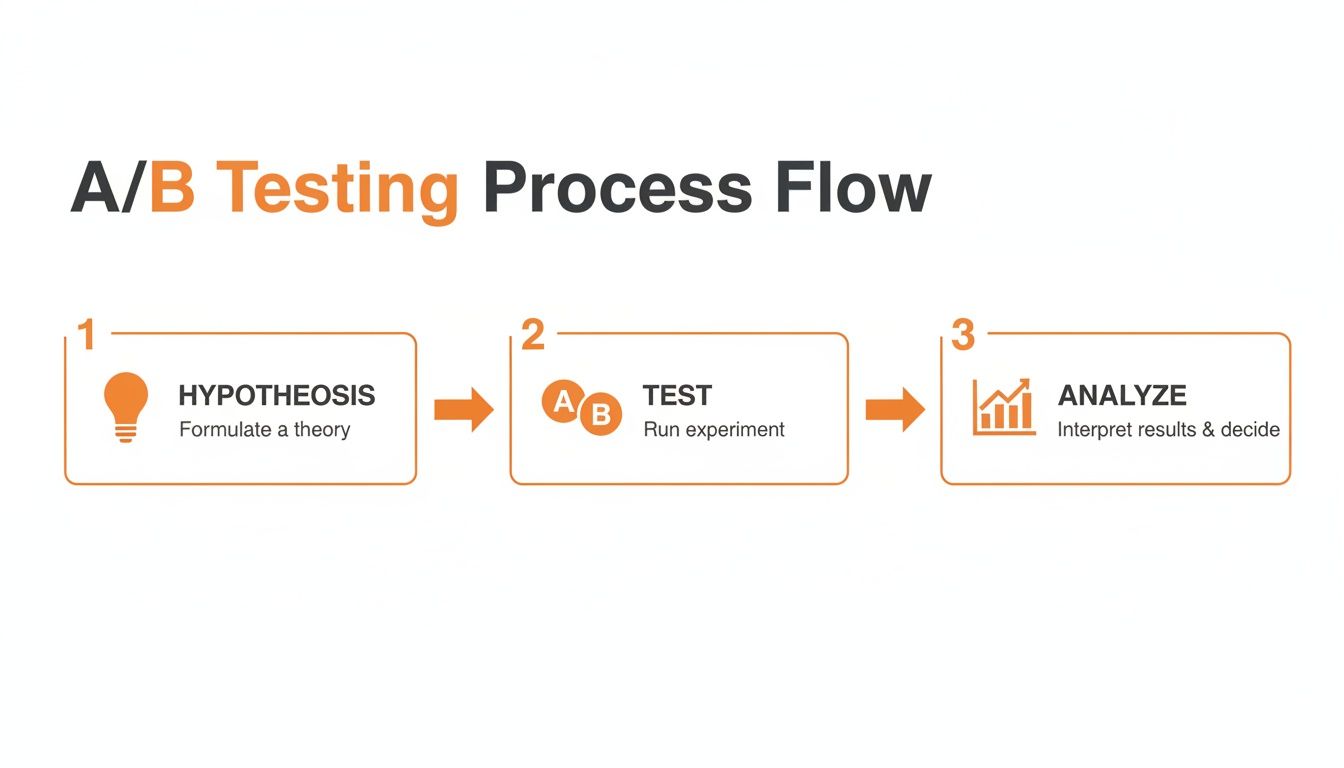
It always starts with a solid hypothesis (your educated guess), then you run the test, and finally, you analyze the results. That’s the core of data-driven CRO.
Your Quarterly CRO Checklist
CRO isn’t a one-time project. It’s a habit. To keep the momentum going, I use a simple checklist every quarter. This keeps me focused and makes sure the work gets done.
Think of this as a quarterly health checkup for your store. It forces you to check the vitals, find what's wrong, and make a treatment plan for the next 90 days. It's how you keep your store healthy and growing.
The Quarterly Audit:
- Check Your Vitals: What’s my overall conversion rate? Add-to-cart rate? Checkout completion rate? How do these numbers compare to last quarter?
- Watch the Tapes: I spend at least an hour in Hotjar watching session recordings. What are the top 3 friction points you see over and over?
- Run a Speed Test: I pop my homepage, a top collection page, and my best-selling product page into Google PageSpeed Insights. Did a new app slow you down? Be honest.
- Find Your Next Test: Based on everything you just learned, what’s the single biggest opportunity you see? Form one strong, clear hypothesis for a test you can run this quarter.
- Set a Real Goal: Define what a "win" looks like. Don't be vague. I aim for something specific, like "increase mobile add-to-cart rate by 10%" or "cut checkout abandonment by 5%."
My Quick Answers to Your CRO Questions
I get a lot of questions from founders about conversion rate optimization for Shopify. They're usually the same ones, so I've put my quick answers together here for you.
What’s a Good Conversion Rate for a Shopify Store in 2026?
Let’s be honest, the industry average is a pretty disappointing 1.4%. When founders ask me what’s “good,” I tell them to aim for anything consistently over 2%.
The stores I see that are really crushing it often break the 3.5% barrier.
But you have to take that with a grain of salt. Your number will swing based on your industry, product cost, and traffic source. A visitor from my warm email list is completely different from someone who clicked a random social media ad.
The only benchmark that truly matters is your own. Your goal should always be to beat last month's number.
How Long Should I Run an A/B Test on Shopify?
You have to let a test run until you hit what’s called “statistical significance,” which for me is a 95% confidence level.
Think of it like a political poll. You wouldn't survey just 10 people and call an election, right? It's the same deal here. You need enough data to be sure your result isn't just a fluke.
For most stores I work with, this means running a test for at least two to four weeks. That gives you enough time to see how people behave on weekdays versus weekends. Whatever you do, don't get impatient and end a test early just because one version is pulling ahead. That's a classic rookie mistake I see all the time.
Can Too Many Shopify Apps Hurt My Conversion Rate?
Yes. Absolutely. This is one of the biggest self-inflicted wounds I see store owners make.
Every single app you add to your store can inject code into your theme. That extra code slows your site down, and a slow website is a conversion killer. It’s that simple.
I tell founders to audit their apps every quarter. Be ruthless. If you aren't using an app or it barely adds any value, I tell them to uninstall it. Always choose apps known for being lightweight and well-coded. It makes a massive difference in your site speed and, ultimately, your sales.
If you’re a kind, hard-working founder in the Midwest looking to build your brand alongside peers who get it, you should consider joining Chicago Brandstarters. I created it as a free, private community focused on real support and shared learning, not transactional networking. You can learn more and see if it's the right fit for you at https://www.chicagobrandstarters.com.